010-6097 4119Book a Demo


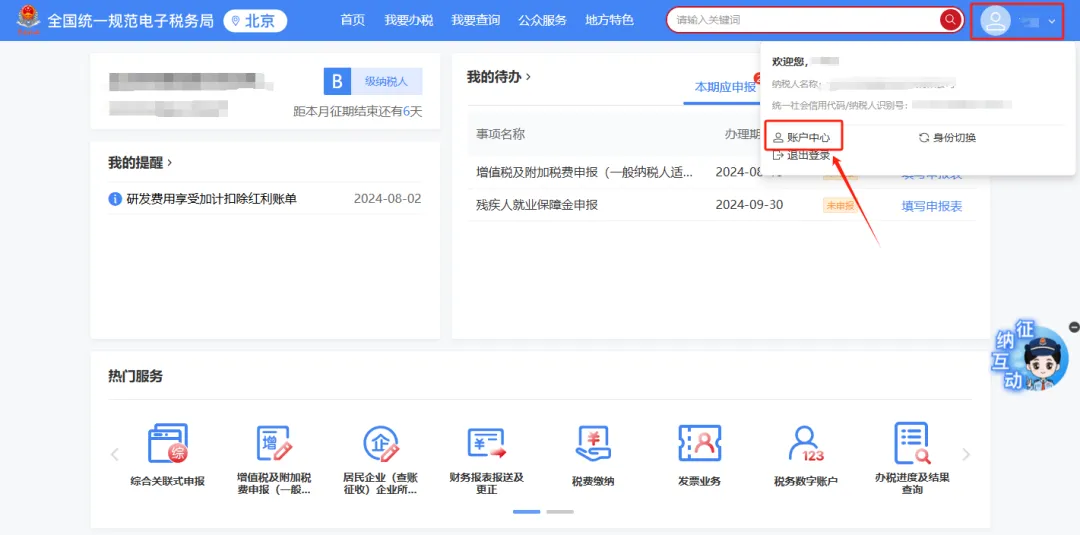
The enterprise's invoicing operator cannot enter the digital account, but other tax handlers can. How should this be handled?Published: 2024-09-14 16:37 1.In the New Electronic Tax Bureau, if an enterprise invoicer identity cannot enter the digital account, but other real-name tax officers can enter, how should this be handled? Answer:Invoicers must obtain authorization from the legal representative or financial officer before they can use functions related to the "tax digital account." The specific authorization operation is as follows: after the enterprise legal representative or financial officer logs into the new electronic tax bureau with an enterprise business identity, click the rightClick the avatar in the upper corner → "Account Center" to enter "Account Center," click "Personnel Permission Management" → "Existing Tax Handlers," click [Manage] in the action column of the tax handler whose permissions need to be modified; the system pops up the "Personnel Permission Management" dialog, click [Modify] after "Personnel Permissions"; in the "Select Personnel Permissions" dialog, check "Invoice Business" and click [Confirm] below; click [OK] in the "Personnel Permission Management" dialog, and the tax handler (invoicer) permission is successfully granted. The illustrated guidance is as follows: I. Click the avatar in the upper right corner → "Account Center" to enter the "Account Center."
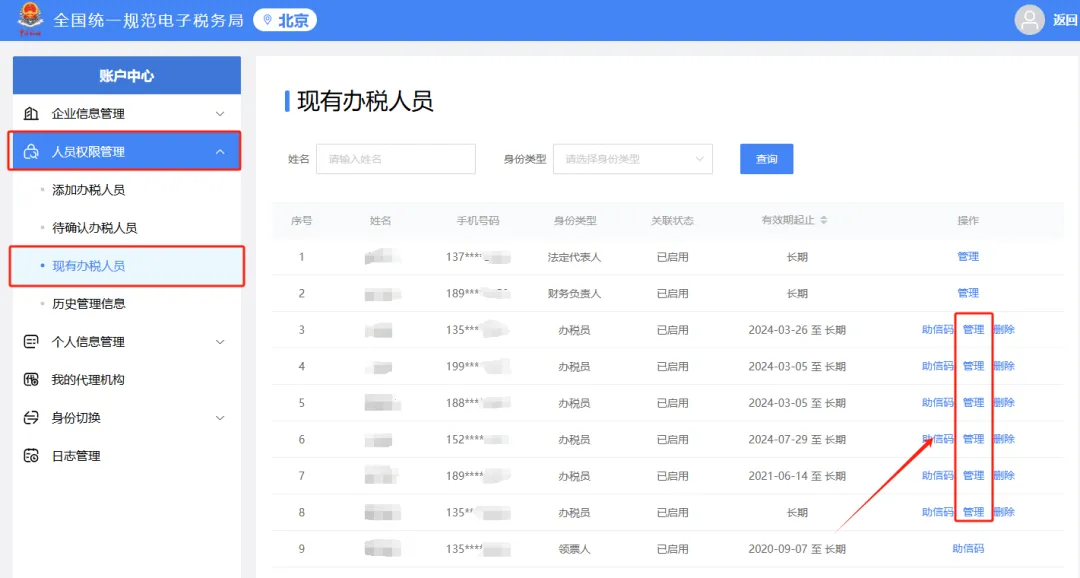
II. Click "Personnel Permission Management" → "Existing Tax Handlers", and click [Manage] in the operation column of the tax handler whose permissions need to be modified.
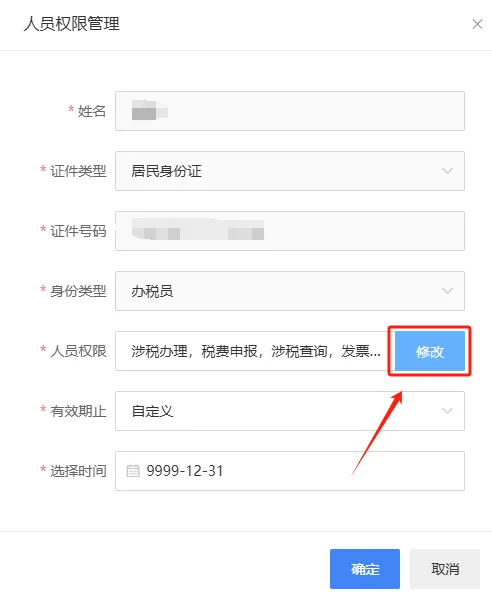
III. The system pops up the "Personnel Permission Management" dialog box; click [Modify] after "Personnel Permissions".
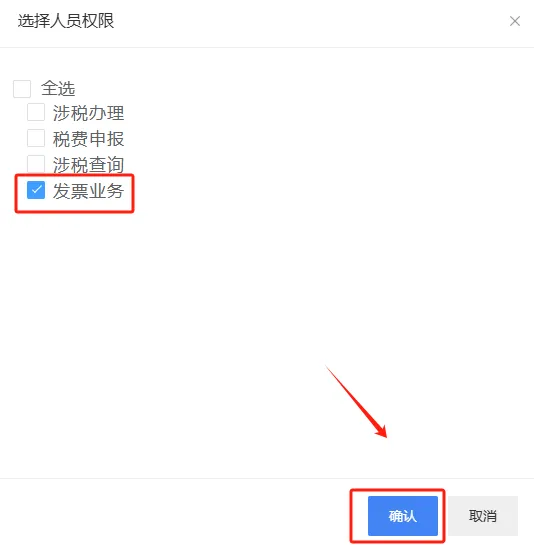
IV. In the "Select Personnel Permissions" pop-up, check "Invoice Business" and click [Confirm] below.
V. Click [Confirm] on the "Personnel Permission Management" pop-up, and the fully digitalized e-invoice business permissions are successfully granted to the tax handler (invoice issuer).
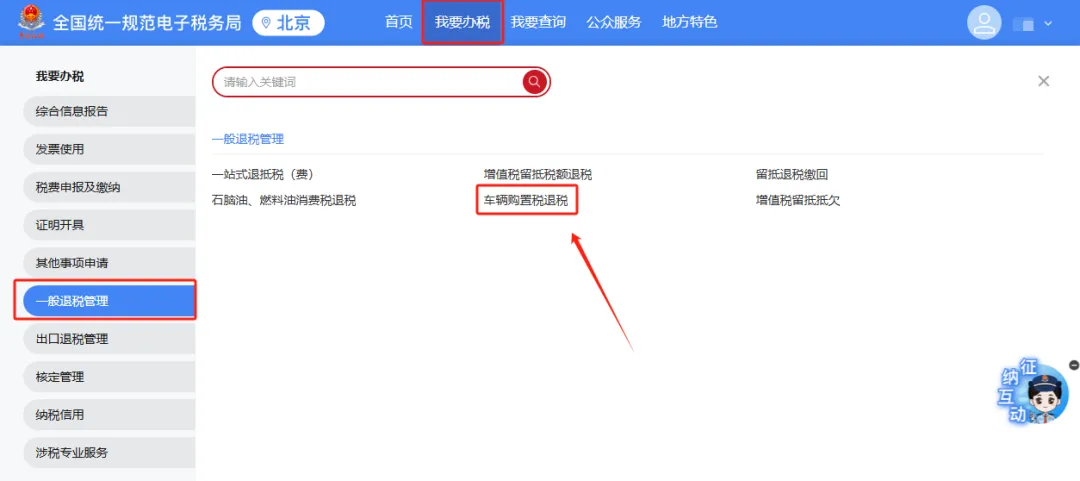
2.Can the vehicle purchase tax refund function in the New Electronic Tax Bureau be used when logging in with an individual identity? Answer:Log in to the Beijing Municipal Electronic Tax Bureau of the State Taxation Administration as a natural person: [I Want to Handle Taxes] — [General Refund Management] — [Vehicle Purchase Tax Refund]. The illustrated guidance is as follows: I. I Want to Handle Taxes—General Tax Refund Management—Vehicle Purchase Tax Refund.
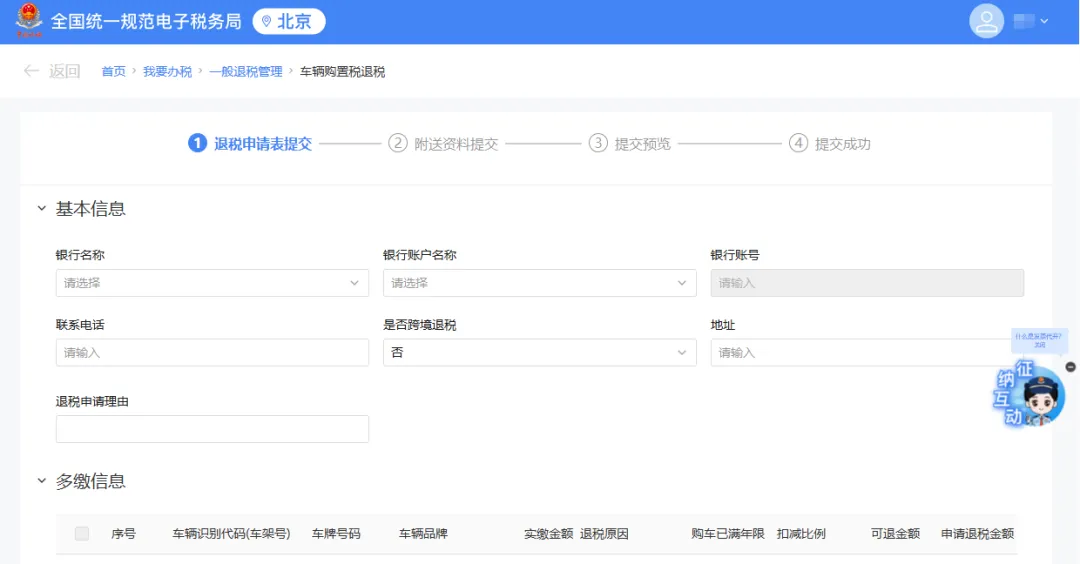
II. Vehicle purchase tax refund page.
3.Does an enterprise filing differential taxation business for the first time need to register a differential taxation item? Answer:Currently, in the new electronic tax bureau, there is no need to register differential taxation items; they can be filled in the corresponding columns at the time of filing. Source: Beijing Tax Kailing Technology provides enterprise business-finance-tax digital product lines according to enterprise needs: Solutions for businesses including sales contract management system, procurement contract management system, fully digitalized Leqi interface project, output automatic invoicing system, employee expense control and reimbursement system, input VAT invoice management system, supply chain collaborative reconciliation system, image OCR recognition system, automatic financial bookkeeping system, and electronic accounting archives system, professionally and efficiently supporting the transformation and upgrading of enterprise business-finance-tax digital management. If you have any business-finance-tax digital transformation needs, welcome to contact us. Beijing Kailing Technology will serve you wholeheartedly.
|