010-6097 4119Book a Demo


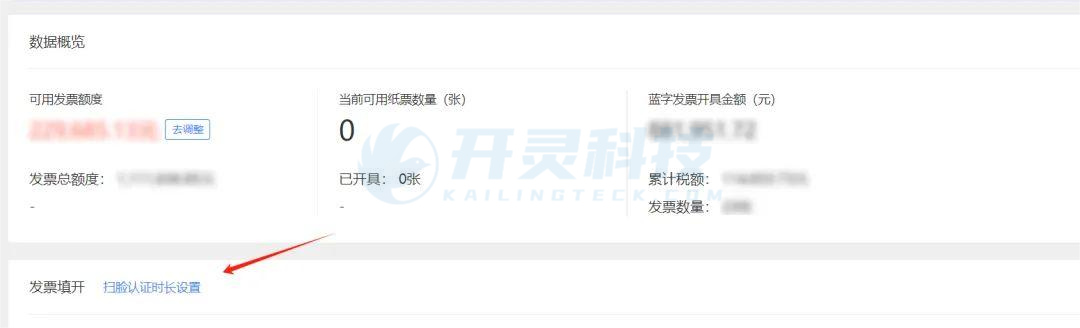
Issuing fully digitalized e-invoices "without face scanning"? As of today, the new fully digitalized e-invoice policy is here!Published: 2024-08-02 16:53 Recently, fully digitalized e-invoices were updated, addingEnterprises "exempt from face scanning",Enterprises that "occasionally scan faces"(occasionally refers to half a year),Enterprises that "do not frequently scan faces"(not frequently means once a quarter),Enterprises "maintaining current face scanning"So, which enterprises specifically does it apply to? No face scan required Enterprises "exempt from face scanning": including government agencies, central and state-owned enterprises, thousand-household groups, provincial key taxpayers, listed companies, etc., whose invoicing is "exempt from face scanning"; Occasional face scan “Occasional face scan" enterprises (occasionally referring to 183 days in half a year): including taxpayers with fully digitalized e-invoice quota level Class IV and credit rating Grade A; those with fully digitalized e-invoice quota level Class IV or Class III and credit rating BCM level are subject to requirements such as usage duration after fully digitalized e-invoice verification and tax paid; small-scale or non-assessed enterprises without credit ratings have more requirements; Do not scan face frequently. Enterprises that "do not frequently scan faces" (not frequently means 90 days in a quarter): fully digitalized e-invoice quota level Class IV or Class III and credit rating BCM level; after fully digitalized e-invoice verification, the requirements for usage duration and treasury remitted tax amount are lower than those for enterprises that "occasionally scan faces"; small-scale or non-participating enterprises without a credit rating will have more requirements; Maintain the current face scan Enterprises "maintaining current face scanning": including Grade D taxpayers, fully digitalized quota Grades I and II, negative-list taxpayers, etc. Setting method It must be based onLogin with the account of the legal representative or financial officerOnly then can the authentication interval be set; invoicing clerks cannot set it, nor can it be set for a specific person individually. After setting, all personnel (including legal representative, finance head, and invoicer) follow the set face-scan interval. After setting it up in the electronic tax bureau,Kailing Technology·The Lingshuitong system alsoWill synchronize the authentication duration. Log in to the Electronic Tax Bureau and click "I Want to Handle Tax Matters”--“Invoice Usage"--"blue-letterInvoice issuance”;
Click "Face-Scan Authentication Interval Setting" to see the maximum face-scan interval automatically assessed by the system that can be set, and set it.
Kailing Technology provides enterprise business-finance-tax digital product lines according to enterprise needs: Solutions for businesses including sales contract management system, procurement contract management system, fully digitalized Leqi interface project, output automatic invoicing system, employee expense control and reimbursement system, input VAT invoice management system, supply chain collaborative reconciliation system, image OCR recognition system, automatic financial bookkeeping system, and electronic accounting archives system, professionally and efficiently supporting the transformation and upgrading of enterprise business-finance-tax digital management. If you have any business-finance-tax digital transformation needs, welcome to contact us. Beijing Kailing Technology will serve you wholeheartedly.
|