News Details

How do I log in to the Electronic Invoice Service Platform in the New Electronic Tax Bureau to perform invoice deduction selection?

Published: 2024-07-02 16:18

After the New Electronic Tax Bureau went live, how do I log in to the Electronic Invoice Service Platform? Can you explain the invoice deduction selection operation?

Part.1

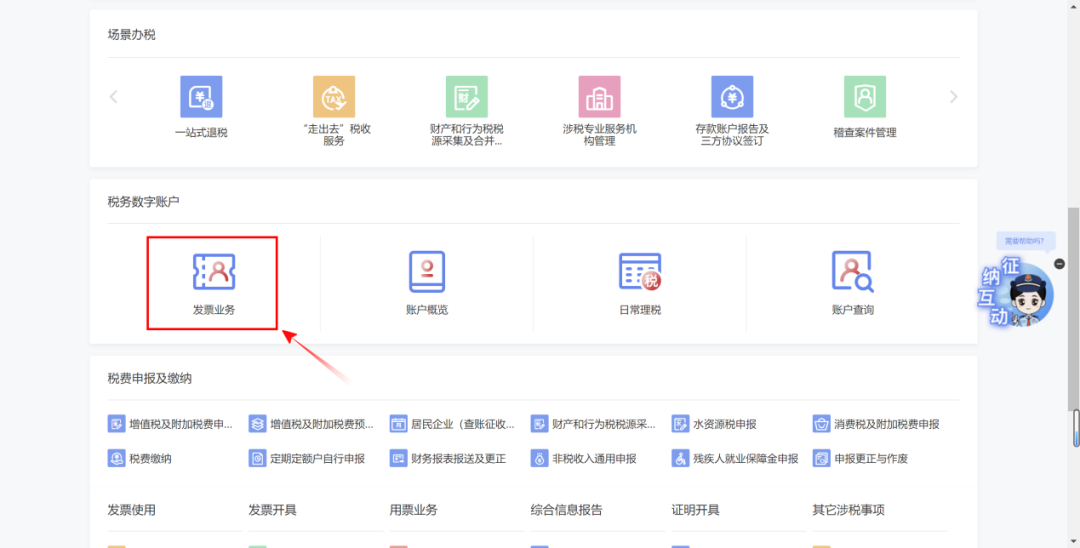
Log in to the nationally unified standardized Electronic Tax Bureau (hereinafter referred to as the "New Electronic Tax Bureau") and scroll the page to[Tax Digital Account]Section, select[Invoice business]and then log in to the electronic invoice service platform.

After the New Electronic Tax Bureau went live, how do I log in to the Electronic Invoice Service Platform? Can you explain the invoice deduction selection operation?


Part.2

The invoice account page of pilot taxpayers of the new electronic tax bureau compared with the original[Tax Digital Account]There are changes.

NoteThe [Tax Digital Account] function of the original electronic invoice service platform has been renamed [Invoice Business].


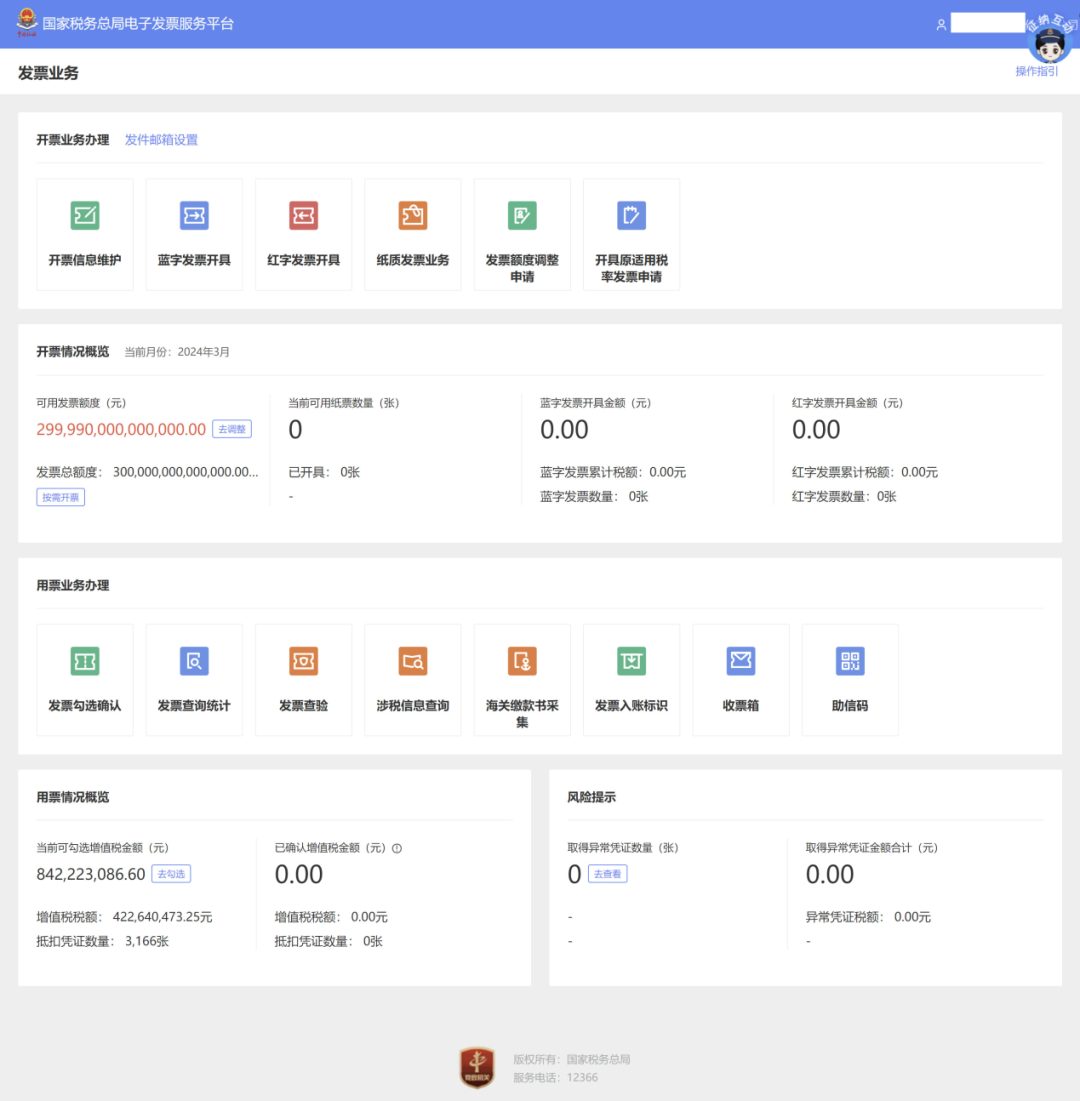
1.For pilot taxpayers of fully digitalized e-invoice issuance and use, the system displays[Invoicing Business Handling]and[Invoice Usage Business Handling]Two major segments.

After the New Electronic Tax Bureau went live, how do I log in to the Electronic Invoice Service Platform? Can you explain the invoice deduction selection operation?

Figure 1:Pilot taxpayers of the new electronic tax bureau log in to the e-invoice service platform invoice business (invoicing + invoice use)


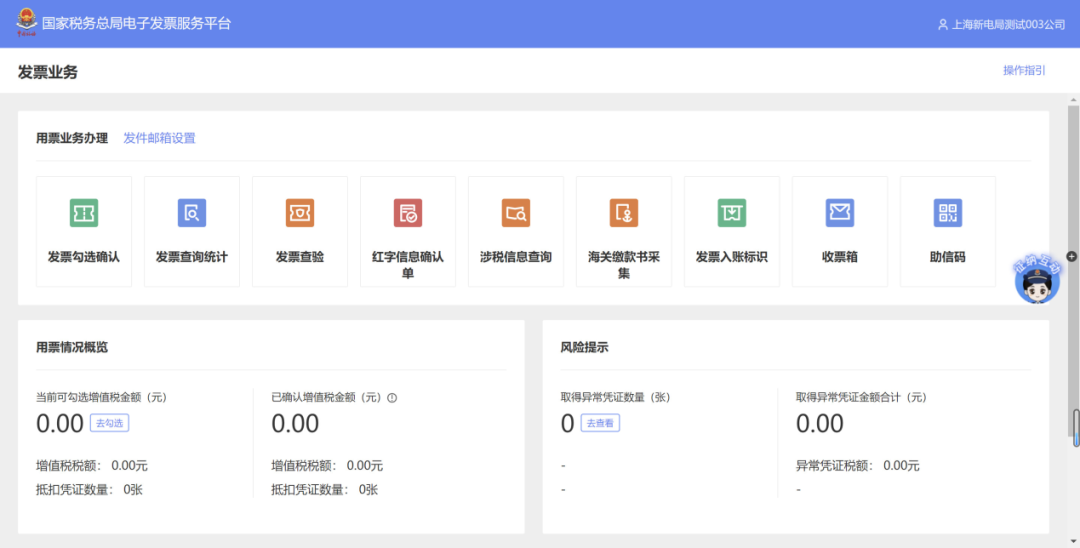
2.For pilot taxpayers of fully digitalized e-invoice use, the system only displays the [Invoice Use Business Handling] section.

After the New Electronic Tax Bureau went live, how do I log in to the Electronic Invoice Service Platform? Can you explain the invoice deduction selection operation?

Figure 2:Pilot taxpayers of the new electronic tax bureau log in to the e-invoice service platform invoice business (invoice use only)


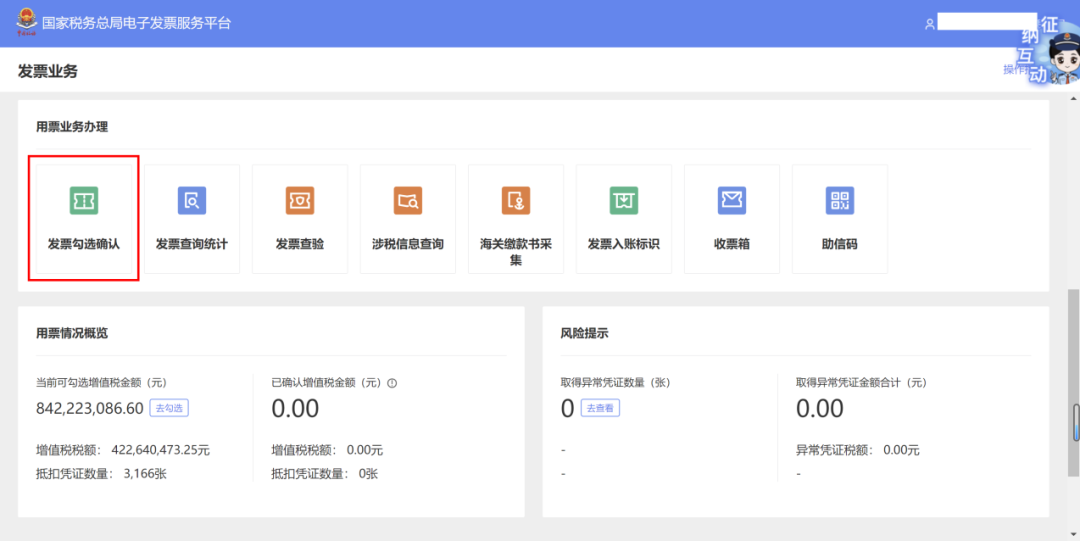
For taxpayers with deduction selection needs, the invoice deduction selection operation path is: [Invoice Business] - [Invoice Use Business Handling] - [Invoice Selection Confirmation] to handle deduction selection for input VAT invoices.

After the New Electronic Tax Bureau went live, how do I log in to the Electronic Invoice Service Platform? Can you explain the invoice deduction selection operation?

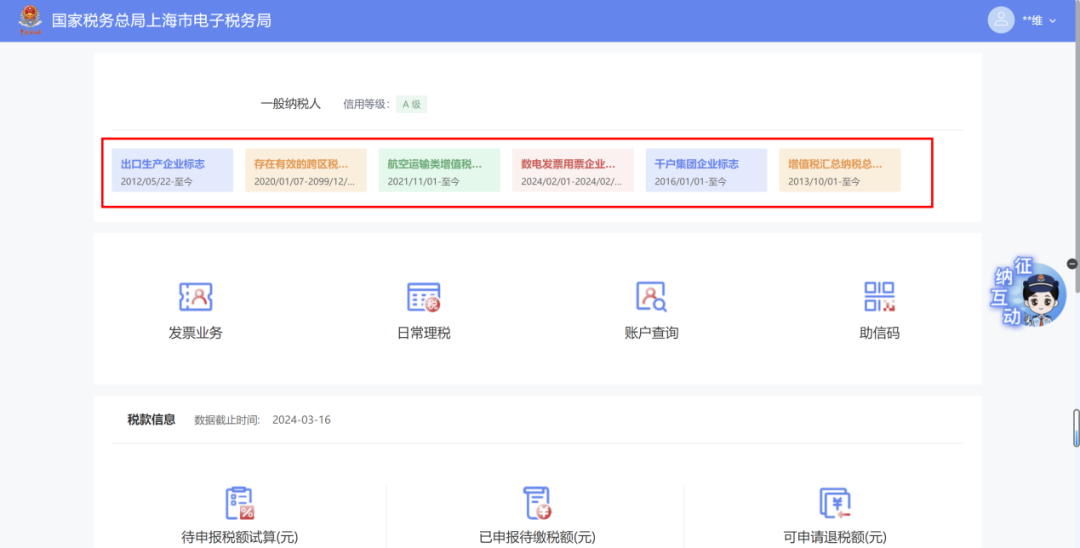
If you want to learn about information such as taxpayer information, tax credit rating, and taxpayer tags at the top of the original electronic invoice service platform, you can click[Account Overview]View.

After the New Electronic Tax Bureau went live, how do I log in to the Electronic Invoice Service Platform? Can you explain the invoice deduction selection operation?

The taxpayer label previously above the tax digital account on the e-invoice platform has been moved to[Account Overview]Above.

After the New Electronic Tax Bureau went live, how do I log in to the Electronic Invoice Service Platform? Can you explain the invoice deduction selection operation?


Tips

Please perform statistical confirmation on the selected VAT deduction vouchers before filing the VAT general taxpayer return! Without confirmation statistics, the input VAT selection will not take effect, and "single-window" comparison will fail, affecting the restoration of your unit's quota and invoicing.


Source: Shanghai Tax


Kailing Technology provides enterprise business-finance-tax digital product lines according to enterprise needs:

Solutions for businesses including sales contract management system, procurement contract management system, fully digitalized Leqi interface project, output automatic invoicing system, employee expense control and reimbursement system, input VAT invoice management system, supply chain collaborative reconciliation system, image OCR recognition system, automatic financial bookkeeping system, and electronic accounting archives system, professionally and efficiently supporting the transformation and upgrading of enterprise business-finance-tax digital management.

If you have any business-finance-tax digital transformation needs, welcome to contact us. Beijing Kailing Technology will serve you wholeheartedly.

After the New Electronic Tax Bureau went live, how do I log in to the Electronic Invoice Service Platform? Can you explain the invoice deduction selection operation?


Share to:
Contact Us

Contact: 010-60974119

VIP Dedicated Consultant: 185-1389-5936

Address: Room 410, 4th Floor, Jianjin Center, No. Jia 1 Yongtaiyuan, Qinghe, Haidian District, Beijing
Scan to add customer service on WeChat
Industry Websites
Scan to follow our WeChat official account
Scan to view our video account
Scan to follow our Douyin account
Common Questions
How do I log in to the Electronic Invoice Service Platform in the New Electronic Tax Bureau to perform invoice deduction selection?
After logging in to the new Electronic Tax Bureau, scroll to the [Tax Digital Account] section and select [Invoice Business] to enter the Electronic Invoice Service Platform. Then click [Invoice Selection and Confirmation] under [Invoice Usage Business Handling] to handle the deduction selection of input VAT invoices. Note: the original [Tax Digital Account] function has been renamed [Invoice Business].
What else is needed after invoice deduction selection for it to take effect?
Before VAT general taxpayers file their tax returns, they must statistically confirm the VAT deduction vouchers they have already selected. If statistical confirmation is not made, the input VAT selection will not take effect, causing the "one-window" comparison to fail and affecting credit limit restoration and invoicing.
What changes have occurred to the invoice account page of pilot taxpayers of the new electronic tax bureau?
The [Tax Digital Account] function of the original electronic invoice service platform has been renamed [Invoice Business]. Pilot taxpayers for both fully digitalized e-invoice issuance and use will see two major sections: [Invoice Issuance Business Handling] and [Invoice Use Business Handling]; pilot taxpayers for use only will see only the [Invoice Use Business Handling] section. Tags such as taxpayer information and tax credit rating have been moved above [Account Overview].
How to check taxpayer information in the invoice business of the new electronic tax bureau?
On the [Invoice Business] page of the new electronic tax bureau, click [Account Overview] to view information such as taxpayer information, tax credit rating, and taxpayer tags formerly shown above the electronic invoice service platform. The taxpayer tags formerly above the tax digital account on the e-invoice platform have been moved above [Account Overview].
Related solutions
Leqi Direct Connection solution
Direct connection to the tax bureau's Leqi channel, connecting the last mile of ERP →
Input invoice collection management platform
Full-process control of intelligent collection, check-and-authenticate, and risk interception →
Enterprise expense control and reimbursement system
Intelligent reimbursement, compliance control, one-click bookkeeping →
Further Reading
What are the differences between the new and old electronic tax bureaus?
What are the differences between the new and old electronic tax bureaus? Kailing Technology (Beijing Kailing Technology Co., Ltd.)... →
Application guide for "Leqi Service"
The comprehensive rollout of the "fully digitalized e-invoices" pilot combined with the new technology empowerment of "Leqi Services" brings enterprises... →
How to securely build a Leqi platform
1. Empowerment of centralized and shared financial management; Leqi services adopt the "tax-enterprise direct connection" model,... →