010-6097 4119Book a Demo


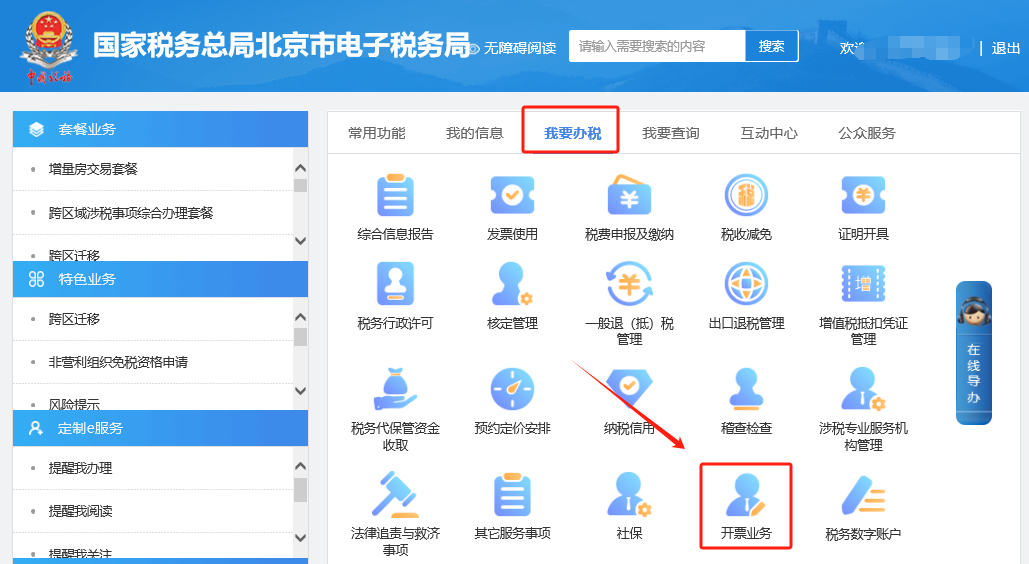
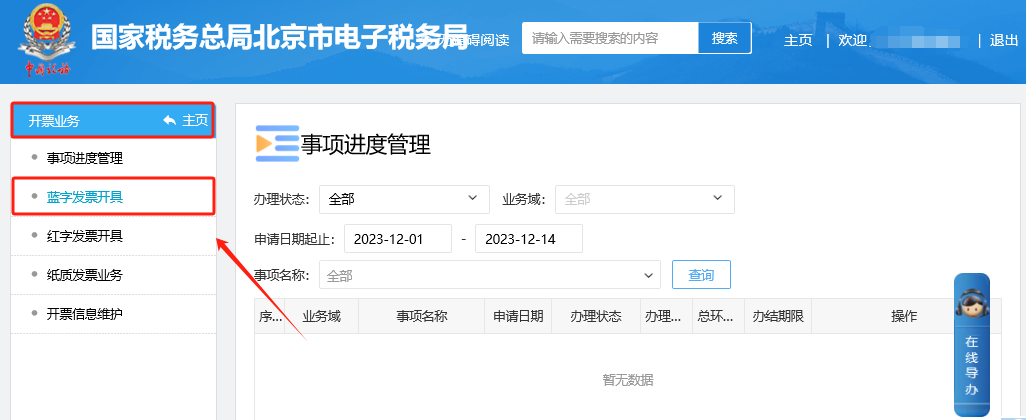
Hot issues on the issuance, delivery, and accounting of fully digitalized e-invoices are here!Published: 2024-03-15 11:20 Directory of hot issues on fully digitalized e-invoices1.How to know whether your company is a fully digitalized e-invoice enterprise and whether it can issue fully digitalized e-invoices? 2.In the invoicing business/tax digital account on the Electronic Tax Bureau, clicking [Invoice Print] prompts: No print service detected on this machine. How should this be handled? 3.When issuing a fully digitalized e-invoice on the electronic tax bureau, how do you set email delivery information? 4.How do I perform quota allocation for fully digitalized e-invoices on the Electronic Tax Bureau? 5.If fully digitalized e-invoices are already issued, is monthly tax reporting still required? 6.For a fully digitalized e-invoice, after filling in the address and bank information of both buyer and seller on the invoicing interface, only the taxpayer identification number and company name appear when clicking preview. Is this normal? 7.After successfully issuing a fully digitalized paper invoice on the Electronic Tax Bureau, how do I print it? 8.What matters should a taxpayer pay attention to when issuing and obtaining a fully digitalized e-invoice for reimbursement, accounting, and archiving? 1.How to know whether your company is a fully digitalized e-invoice enterprise and whether it can issue fully digitalized e-invoices? Answer: Hello, please log in to the Electronic Tax Bureau and enter the [I Want to Handle Taxes] — [Invoicing Business] — [Blue-letter Invoice Issuance] module. If you can normally enter this module, correctly display the total invoice quota, and issue invoices, you have been included in the pilot promotion scope. If you cannot enter this module, the system will prompt that you are a non-fully-digitalized-e-invoice pilot taxpayer and are not allowed to issue invoices. If you have any questions, you can consult the competent tax authority for handling. The illustrated guidance is as follows I. I Want to Handle Taxes—Invoicing Business.
II. In the Invoicing Business - Blue-letter Invoice Issuance module, if you can normally enter the module, correctly display the total invoice limit, and issue invoices, then you have been included in the pilot promotion scope. If you cannot enter the module, the system will prompt that you are a non-fully-digitalized-e-invoice pilot taxpayer and are not allowed to issue invoices. If you have questions, you may consult the competent tax authority for handling.
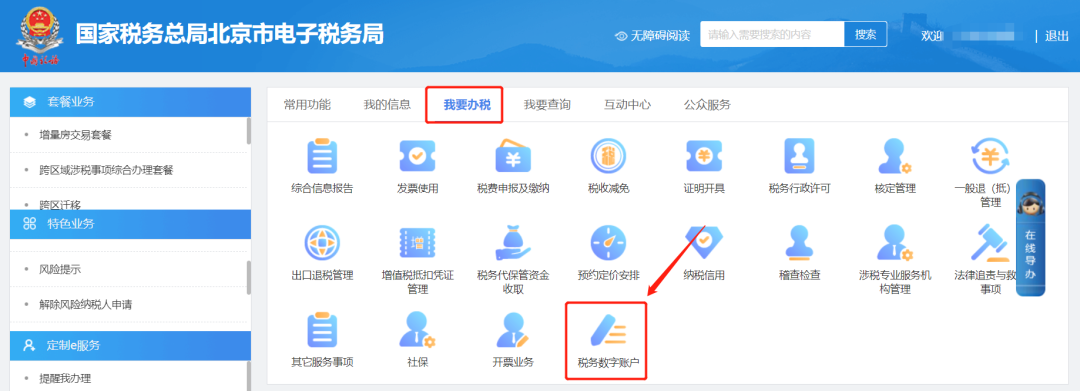
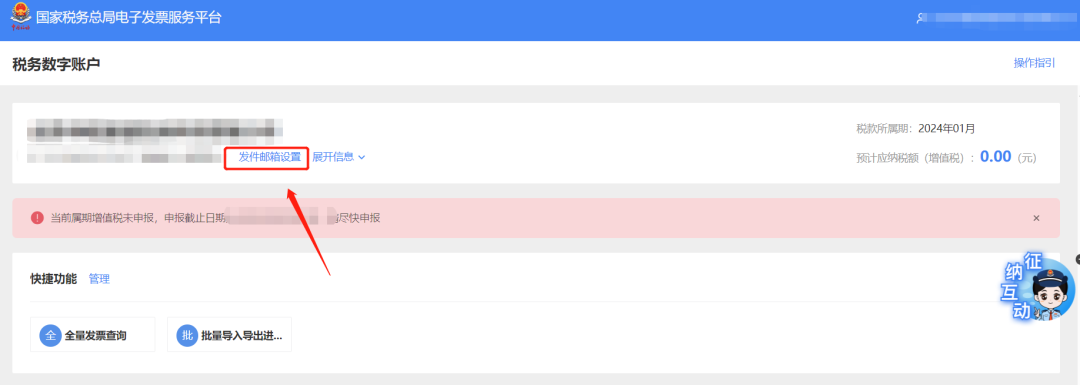
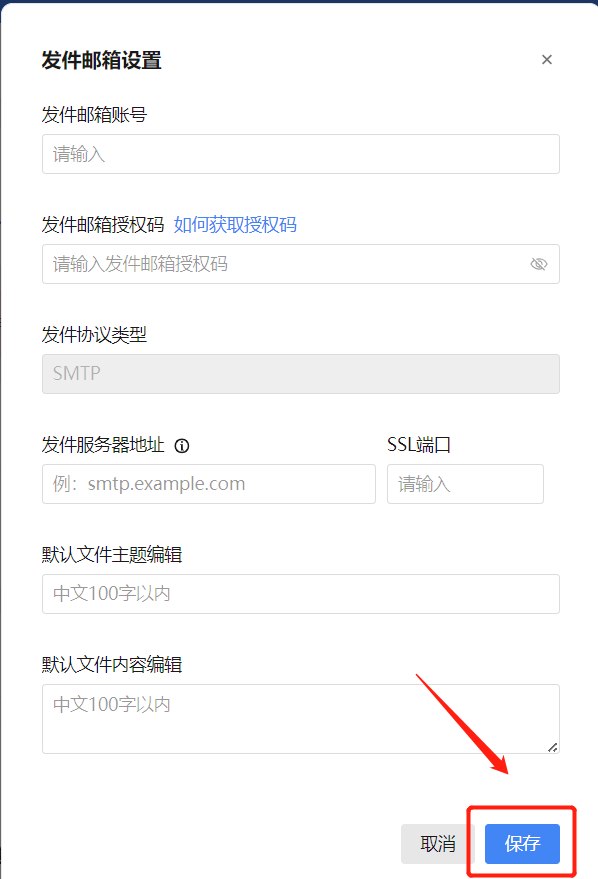
2.In the invoicing business/tax digital account on the Electronic Tax Bureau, clicking [Invoice Print] prompts: No print service detected on this machine. How should this be handled? Answer: Hello, please first confirm whether the latest version of the print control has been successfully installed on the computer. If the new version of the print control has been installed but the message "No print service detected on this machine" still appears when printing invoices, you can click the "Print Help" link in the pop-up window, download the "Common Problems in Print Service Handling" document, and handle it according to the requirements of the "No Print Service Detected" section. 3.When issuing a fully digitalized e-invoice on the electronic tax bureau, how do you set email delivery information? Answer: Hello, there are two methods for setting this up, as follows: 1. You can click the "Sender Email Settings" link in the company name column on the homepage of [I Want to Handle Taxes] — [Tax Digital Account]. The system will pop up the "Sender Email Settings" page. On this page, the taxpayer enters the "sender email account," "sender email authorization code," "sender server address," and "SSL port" information in sequence, then clicks "Save." 2. After an invoice is successfully issued, when email delivery is selected, if the relevant information has not been set, the system will prompt that the sender email has not been maintained and enter the "Sender Email Settings" screen. On this page, the taxpayer enters the "Sender Email Account", "Sender Email Authorization Code", "Sender Server Address" and "SSL Port" information in sequence, then clicks "Save". The illustrated guidance is as follows Method 1: I. I Want to Handle Taxes—Tax Digital Account.
II. On the company name column of the tax digital account homepage, click the "Sender Email Settings" link, and the system will pop up the "Sender Email Settings" page.
III. On this page, the taxpayer enters "Sender Email Account", "Sender Email Authorization Code", "Sender Server Address", and "SSL Port" information in sequence, then clicks "Save".
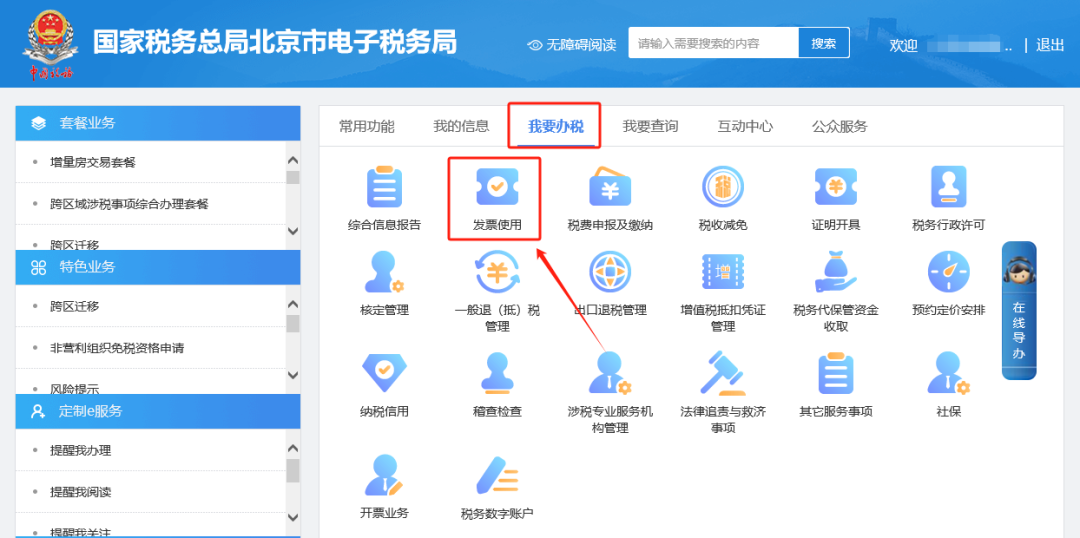
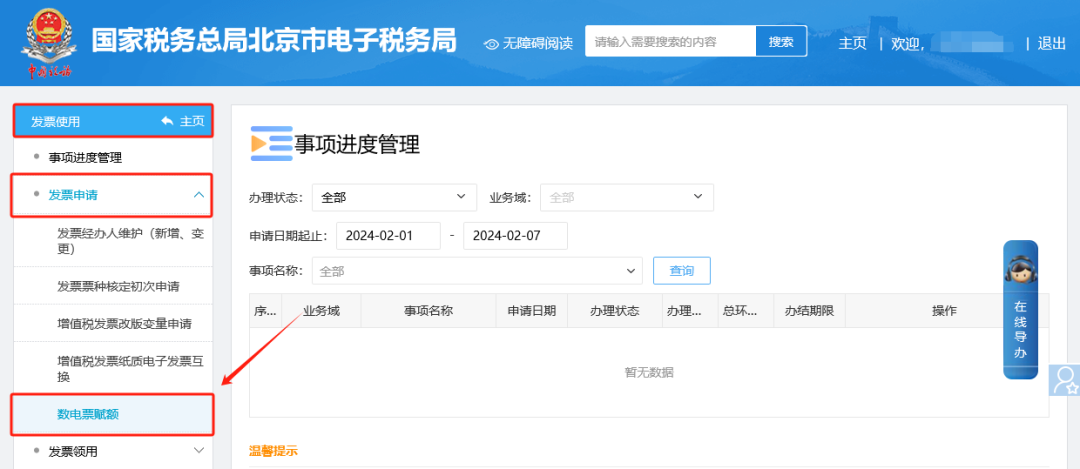
Method 2: When email delivery is selected after successful invoice issuance, if the relevant information has not been set, the system will prompt that the sender email has not been maintained and enter the "Sender Email Settings" interface. The taxpayer enters the "sender email account", "sender email authorization code", "sender server address", and "SSL port" information in sequence on this page, and clicks "Save". 4.How do I perform quota allocation for fully digitalized e-invoices on the Electronic Tax Bureau? Answer: Hello, please go through the Electronic Tax Bureau [I Want to Handle Taxes] — [Invoice Use] — [Invoice Application] — [Fully Digitalized E-Invoice Quota] module. After entering, if there is no monitoring information, please read the system text prompts, confirm they are correct, and click "Next". When the system interface shows the "Tax-Related Matter Acceptance System Receipt", it means the business has been successfully submitted. You can check the acceptance progress of the business matter in "Matter Progress Management". The illustrated guidance is as follows I. I Want to Handle Taxes—Invoice Use.
II. Enter Invoice Use - Invoice Application - Fully Digitalized E-Invoice Limit Module. After entering, if there is no monitoring information, please browse the system text prompts, confirm they are correct, and click "Next". When the system interface shows the "Tax-related Matter Acceptance System Receipt", it means the business has been successfully submitted. The acceptance progress of the business matter can be queried in "Matter Progress Management".
5.If fully digitalized e-invoices are already issued, is monthly tax reporting still required? Answer: Hello, after the launch of fully digitalized e-invoices, if the tax control equipment has not been deregistered, it is necessary to normally perform the reporting and clearing of the tax control equipment; if the tax control equipment has been deregistered, there is no need to perform the reporting and clearing work. 6.For a fully digitalized e-invoice, after filling in the address and bank information of both buyer and seller on the invoicing interface, only the taxpayer identification number and company name appear when clicking preview. Is this normal? Answer: Hello, this is normal. The face of a fully digitalized e-invoice only displays the "taxpayer name" and "unified social credit code/taxpayer identification number" of both the buyer and seller. If the corresponding account-opening bank and bank account information need to be displayed, you can check the "whether to display" option after the bank information in the buyer and seller information sections on the invoicing interface to display them. 7.After successfully issuing a fully digitalized paper invoice on the Electronic Tax Bureau, how do I print it? Answer: Hello, after a taxpayer successfully issues a fully digitalized paper invoice in the [Blue-letter Invoice Issuance] module, they can click the "Print Invoice" button on the pop-up page and connect a printer to print the invoice. If printing was not possible at that time, the taxpayer can later also use the "Recent Invoicing" function in the [Blue-letter Invoice Issuance] module or [Full VolumeInvoice query] Find the corresponding invoice in the module, click the "Preview" button to enter the invoice preview interface, and click "Print Invoice". (Please test with blank paper before printing for the first time) 8.What matters should a taxpayer pay attention to when issuing and obtaining a fully digitalized e-invoice for reimbursement, accounting, and archiving? Answer: Taxpayers issuing and obtaining fully digitalized e-invoices for reimbursement, accounting, and archiving shall comply with the relevant provisions of the Notice of the Ministry of Finance and the National Archives Administration on Standardizing the Reimbursement, Accounting, and Archiving of Electronic Accounting Vouchers (Cai Kuai [2020] No. 6, hereinafter referred to as the Notice), the Measures for the Management of Accounting Archives (Order No. 79 of the Ministry of Finance and the National Archives Administration), and the Notice of the Accounting Department of the Ministry of Finance on Publishing the Accounting Data Standards for Electronic Vouchers (Trial Version) (Cai Kuai Bian Han [2023] No. 18). First, fully digitalized e-invoices provide three electronic file formats: PDF, OFD, and XML. Among them, PDF and OFD are formats for previewing invoice content, while the XML format containing a digital signature is the electronic file format that meets the Ministry of Finance's accounting requirements. Taxpayers may, in accordance with Articles 3 and 5 of the Notice, use only the XML electronic file of a fully digitalized e-invoice for reimbursement, accounting, and archiving, and may no longer keep it separately in paper form. Second, if a taxpayer needs to use a paper printout of a fully digitalized e-invoice as the basis for reimbursement, accounting, and archiving, it shall, in accordance with Article 4 of the Notice, also retain the XML format electronic file of the fully digitalized e-invoice containing the digital signature. Source: Beijing Chaoyang Tax Beijing Kailing Technology Co., Ltd.——an enterprise business-finance-tax digitalization solution service provider. Kailing Technology provides solutions for sales management systems, procurement management systems, output invoicing systems, input invoice collection systems, imaging management systems, financial posting systems, electronic accounting archives, fully digitalized e-invoice and Leqi interfaces and other businesses according to enterprise needs, professionally and efficiently helping enterprises transform and upgrade their business-finance-tax digital management. If you have any business-finance-tax digital transformation needs, welcome to contact us. Beijing Kailing Technology will serve you wholeheartedly.
|