
How do sole proprietors activate e-invoice issuance? 2026 fully digitalized e-invoice practice

How do sole proprietors activate e-invoice issuance? 2026 fully digitalized e-invoice practice
Sole proprietors who want to issue fully digitalized e-invoices should first confirm their tax identity, their e-tax bureau account permissions, and their available invoice quota, then operate through the invoice business entry of the local e-tax bureau. Fully digitalized e-invoices have been rolled out nationwide; issuance usually does not require obtaining dedicated tax-control equipment in advance, nor does it require a separate invoice type approval for fully digitalized e-invoices. However, it cannot be guaranteed that every taxpayer can issue immediately after logging in; the actual situation depends on account status, the quota assigned by the tax authority, and on-page prompts.
1. Verify identity and invoicing permissions before logging in
Log in to the nationally unified and standardized e-tax bureau using the identity of the operator or an authorized tax handler, and verify the taxpayer registration information, tax handler permissions, tax digital account, and current available quota. If the invoicing entry is not displayed, the account is restricted, or the quota is insufficient, verify through e-tax bureau prompts, tax-collection interaction, or the competent tax authority; do not describe sole proprietors uniformly as "activated immediately by default." Page menus vary by region and may be adjusted.
2. Verify quota, then fill out the blue-letter invoice
Enter the invoice business or blue-letter invoice issuance page, select the applicable invoice type, goods or services, tax classification, and buyer information based on the actual transaction, verify the amount, tax amount, applicable tax policy, and required remarks, then preview and submit. The e-invoice service platform uses a quota mechanism; if the quota is insufficient, you may apply for adjustment according to the local e-tax bureau process, and whether it is approved and when it takes effect is decided by the tax authority. Do not treat the invoicing quota as a tax-exemption quota, and do not copy others' levy rates.
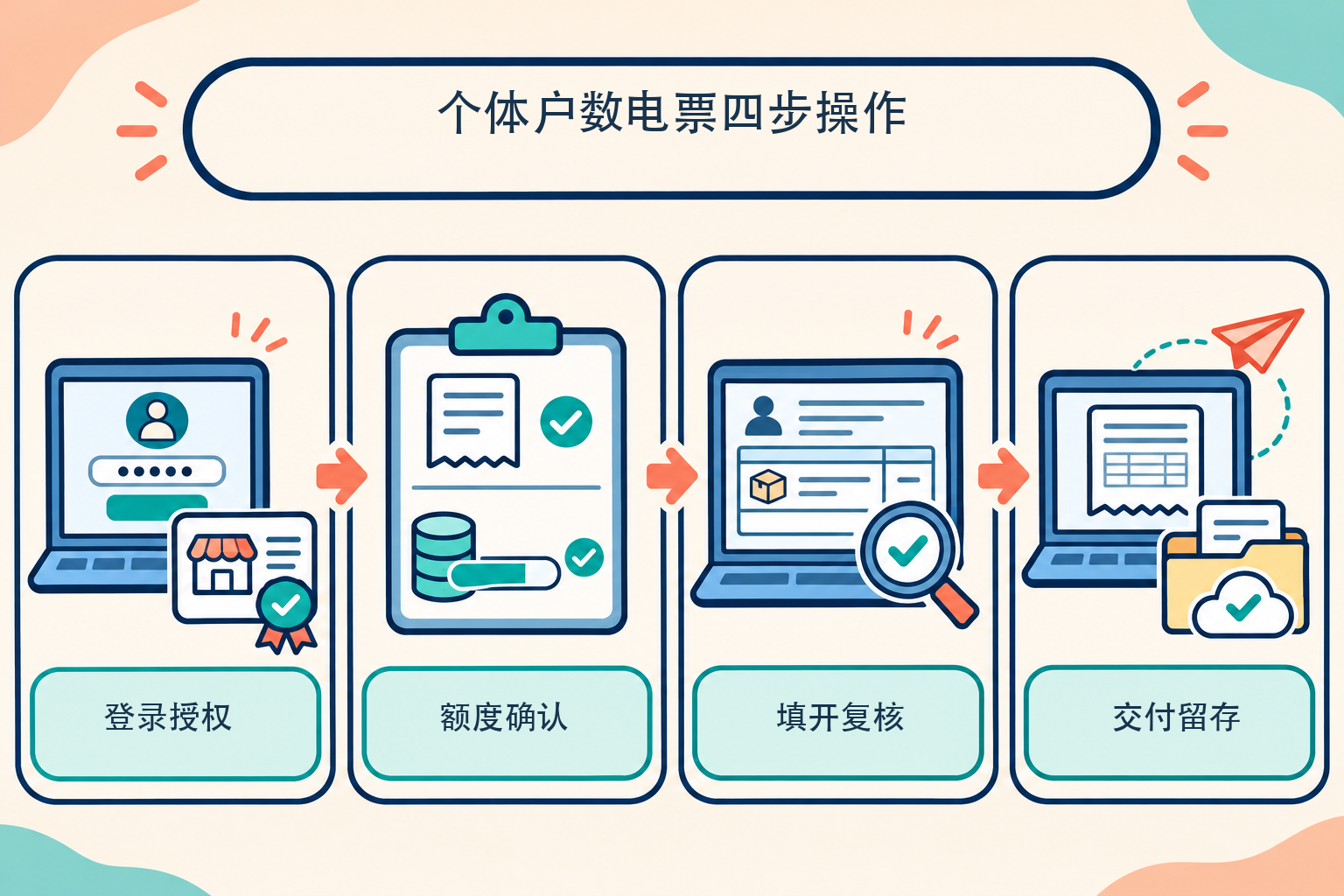
3. Confirm delivery and correction paths after issuance
After successful issuance, record the invoice status and confirm the receiving method with the buyer. Where conditions are met, fully digitalized e-invoices can be delivered automatically through the tax digital account; where automatic delivery is not possible, they may be delivered by the email, QR code, or electronic file methods provided by the platform. If the buyer, amount, or items are found to be incorrect, do not directly delete the issued record; handle it according to the fully digitalized e-invoice red-letter invoice process and the current system prompts.
4. Retain electronic originals and business evidence
Link invoice electronic files with orders, contracts, receipts, and delivery materials, and save originals, metadata, processing records, and necessary backups. Whether electronic accounting materials can be archived solely in electronic form depends on the conditions in the Measures for the Administration of Accounting Archives regarding source, system, review and signing, tamper resistance, and backup; downloading an image or scanned copy alone is not sufficient to make a compliance judgment.
5. When invoicing volume is high, first verify the tool's applicable scope
Kailing Technology's output invoicing and related finance products can serve as candidate tools for batch processing and ledger reconciliation. Whether they can connect to the e-tax bureau, adapt to fully digitalized e-invoices, deliver automatically, or integrate with business systems should be confirmed by region, authorization, product version, and project acceptance. Leqi Direct Connection or combined use also has application and access requirements; sole proprietors cannot connect directly merely because of high invoicing volume. Responsibility for issuance, review, and retention remains with the operator or persons lawfully authorized by them.
Verification Basis
State Taxation Administration announcement on the promotion and application of fully digitalized e-invoices;State Taxation Administration policy interpretation of fully digitalized e-invoices;Tax authority e-tax bureau quota operations Q&A;Ministry of Finance "Measures for the Management of Accounting Archives"。
As a comprehensive business-finance-tax digitalization solution service provider, Kailing Technology provides business-finance-tax management digital transformation products and operational services for various government agencies, institutions, and large, medium, and small enterprises. The product line includes: solutions for sales contract management system, procurement contract management system, fully digitalized Leqi interface project, automatic output invoicing system, reverse invoicing system, invoice issuance for individuals system, employee expense control and reimbursement system, input VAT invoice management system, supply chain collaborative reconciliation system, image AI OCR recognition system, automatic financial bookkeeping system, electronic accounting archives system, etc., comprehensively driving the digitalization process across various fields.
Consultation Hotline: 18513895936 / 010-60974119 Location: Beijing