
How does the e-invoice system invoicing process work? Pre-issuance checks, delivery, and handling of errors

How does the e-invoice system invoicing process work? More important than remembering button locations is holding the four checkpoints: before issuance, before submission, after issuance, and after an error.
The electronic tax bureau interface will be updated, and menus may differ slightly across provinces, but the business logic is relatively stable: invoicing must correspond to a real transaction, a complete preview is required before submission, delivery and status must be verified after issuance, and when an error is found, the red-letter reversal path is selected based on whether the recipient has confirmed use or entered it.
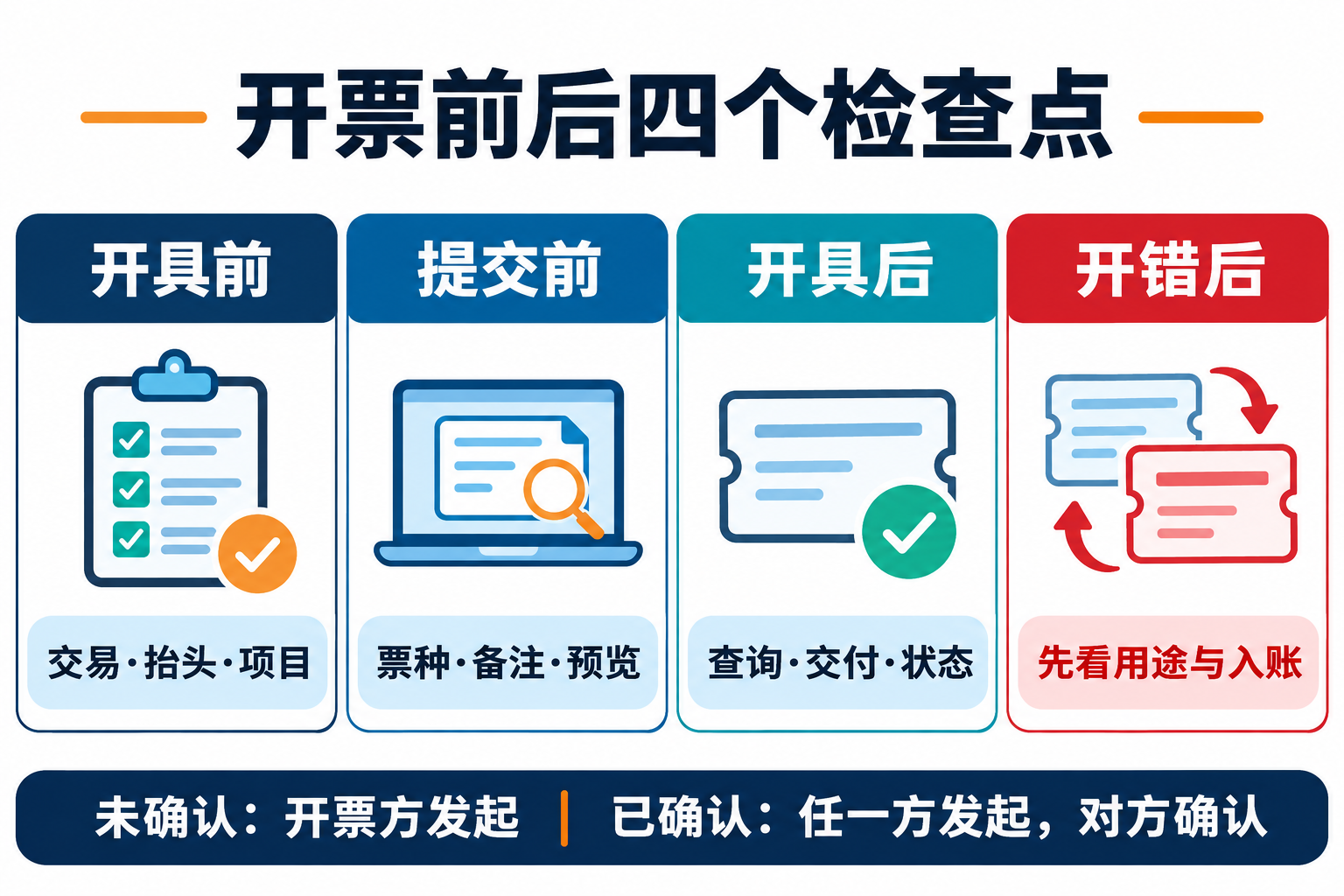
Checkpoint 1: before issuance, verify the transaction, header, and items
First confirm the seller's login entity, the buyer's name and identification information, then check the contract or order, goods outbound or service results, and payment terms. Invoicing items should match the actual transaction; tax classification, tax rate or levy rate, and specific business tags should be determined based on the real business. Do not reuse a single item template long-term for convenience, and do not change invoice content solely based on a customer's verbal request.
Checkpoint 2: before submission, verify invoice type, remarks, and preview
After entering the blue-letter invoice issuance function, select the invoice type and invoice category tag, and fill in the buyer, invoicing items, and necessary information such as handler and remarks. Specific businesses such as construction services and transportation may have special remark or tag requirements, which should be handled according to current regulations and system prompts. Before submission, preview the formal invoice sample and check the header, items, amount, tax rate or levy rate, and remarks item by item against the business documents; issuance is complete only after validation passes and a success prompt appears.
Checkpoint 3: after issuance, query, deliver, and verify status
After successful issuance, confirm the invoice status in official functions such as full invoice query. When conditions are met, the system can automatically deliver to the recipient's tax digital account; when self-delivery is needed, officially supported methods such as email, QR code, or downloading electronic files may be used. Enterprises should also internally retain the delivery recipient, time, and file version; subsequent entry should be judged by finance in conjunction with business evidence, and "successfully issued" or "file sent" must not be written directly as "entered."
Checkpoint 4: after an error, first check use confirmation and entry status
After a fully digitalized e-invoice is issued in error, it should not be directly deleted from the enterprise ledger; it should be handled according to red-letter invoice rules. When the recipient has not made use confirmation or entry confirmation, the issuer fills out the Red-Letter Invoice Information Confirmation Form and can issue a red-letter invoice according to the rules without the recipient's confirmation. When the recipient has already made use confirmation or entry confirmation, either the issuer or the recipient may initiate the confirmation form, and after the other party's confirmation, the issuer issues a full or partial red-letter invoice. If it has already been used for VAT filing deduction, the recipient should also temporarily transfer out the input tax amount as required.
How can a batch invoicing system be reliably accepted?
The value of batch invoicing tools lies in reducing duplicate entry, but acceptance testing should focus on data sources, authorization scope, exception interception, manual review, and logs. Even after order field mapping, business and business-finance-tax rule validation is still required; automatic delivery must also be traceable. When evaluating Kailing Technology's output VAT management, risk control, or electronic archive solutions, desensitized real samples should be used for trial runs, and promotional phrases that cannot be uniformly verified, such as "direct connection to all tax authority invoice sources," "recognition equals entry," or "login-free automatic filing," must not replace acceptance testing.
Conclusion: The correct invoicing process is not clicking through to the end, but stopping four times to verify. Especially after an error, whether the other party's confirmation is needed depends on the use confirmation and entry status of the blue-letter invoice, not merely on who discovered the error first.
Official basis:Tianjin Taxation: blue-letter invoice issuance process;Guangxi Taxation: query and delivery of fully digitalized e-invoices;State Taxation Administration: rules for handling red-letter fully digitalized e-invoices;Tianjin Taxation: red-letter confirmation determination。
As a comprehensive business-finance-tax digitalization solution service provider, Kailing Technology provides business-finance-tax management digital transformation products and operational services for various government agencies, institutions, and large, medium, and small enterprises. The product line includes: solutions for sales contract management system, procurement contract management system, fully digitalized Leqi interface project, automatic output invoicing system, reverse invoicing system, invoice issuance for individuals system, employee expense control and reimbursement system, input VAT invoice management system, supply chain collaborative reconciliation system, image AI OCR recognition system, automatic financial bookkeeping system, electronic accounting archives system, etc., comprehensively driving the digitalization process across various fields.
Consultation Hotline: 18513895936 / 010-60974119 Location: Beijing