
E-invoice system operating process: a five-step checklist from blue-letter issuance to electronic archiving

The e-invoice system operating process can be divided into five steps: enter the invoicing portal, verify the real business, preview and issue, query and deliver, and enter and archive.
Fully digitalized e-invoices have been rolled out nationwide, and taxpayers can handle issuance, delivery, query, and use confirmation through the electronic invoice service platform integrated into the nationally unified and standardized electronic tax bureau. However, menu names and authority displays in different regions may be adjusted with system versions, and actual operations should be based on the local electronic tax bureau pages and the guidance of the competent tax authority.
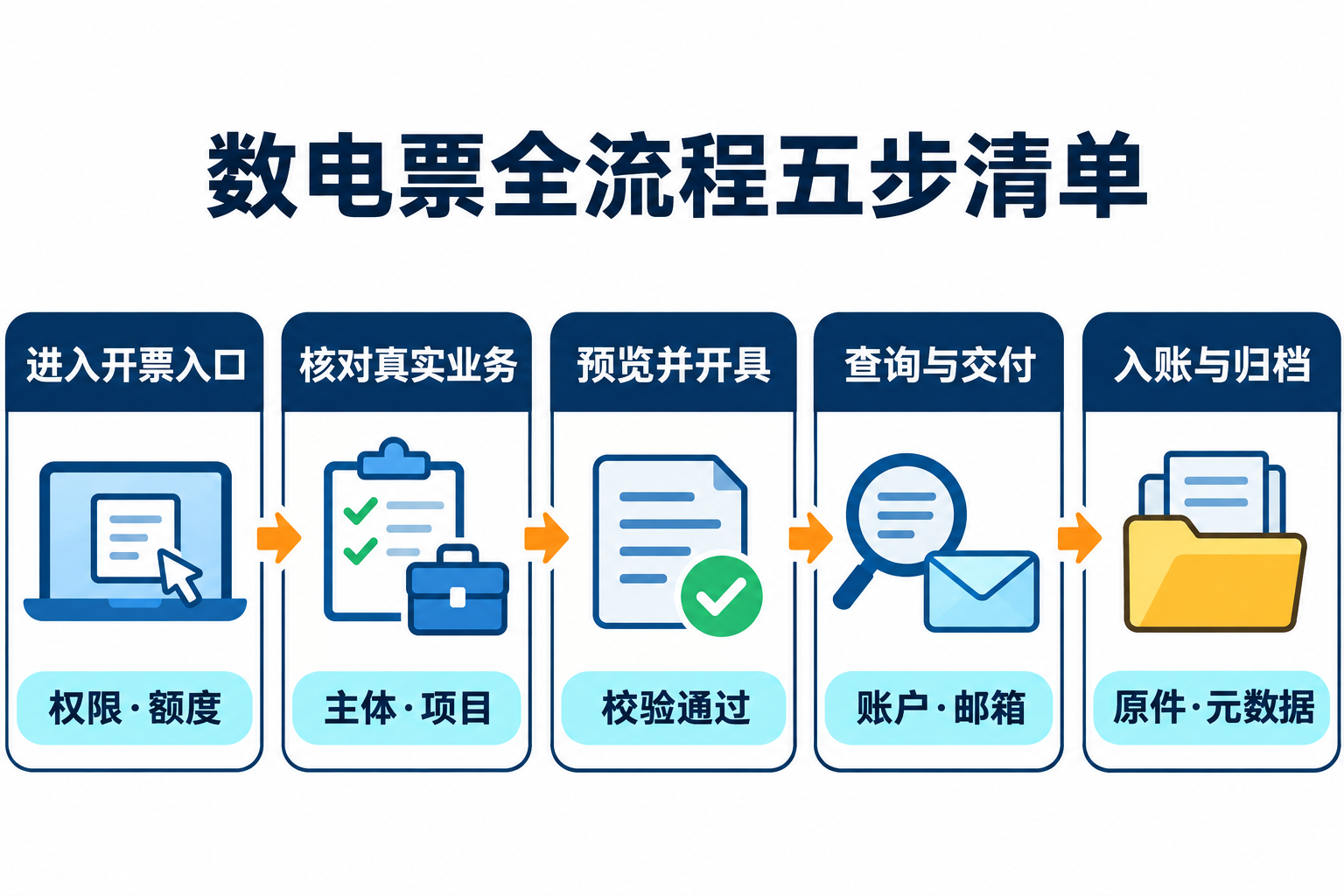
Step 1: enter the invoicing portal, first check personnel authority and available quota
After logging into the electronic tax bureau, invoicing personnel enter the invoice business or blue-letter invoice issuance module. First confirm the current login entity, personnel authority, issuable invoice types, and remaining available invoice quota, to avoid using the wrong tax entity or repeatedly submitting when the quota is insufficient. Personnel authorization and internal role division are part of enterprise internal control and cannot be handled solely through shared accounts.
Step 2: verify the real business and basic invoice information
Before invoicing, the contract or order, delivery records, buyer information, and actual transaction content should be checked together. Item names, tax classification, applicable tax rate or levy rate, specific business tags, and remark requirements should be determined transaction by transaction based on the real business. Maintaining commonly used items can reduce duplicate entry, but it does not mean all enterprises must establish a fixed product library, nor can it replace review of the current transaction.
Step 3: fill in, preview, and issue the blue-letter invoice
In the blue-letter invoice issuance form, select the invoice type and invoice category tag, and fill in the buyer, invoicing items, and other necessary information. Before submission, use the preview function to review the header, items, amount, tax rate or levy rate, and remarks. The invoice is only shown as successfully issued after the electronic invoice service platform passes validation. Successful issuance only generates an invoice and does not mean the enterprise has completed accounting entry.
Step 4: query the invoice and complete delivery
After issuance, the invoice status should be verified through official functions such as full invoice query. When the system meets automatic delivery conditions, invoice data can flow to the recipient's tax digital account; when automatic delivery conditions are not met or re-delivery is needed, delivery may be made via official functions such as email, QR code, or downloading PDF, OFD, or XML files. Enterprises should keep delivery records and verify whether the recipient has received them, rather than treating "issued" directly as "delivered."
Step 5: enter accounts according to policy and archive electronic originals
Finance personnel should complete accounting judgment based on the real business, approval, contract, acceptance, payment, and invoice status before making entries. The Ministry of Finance's public position allows qualifying entities to use only electronic accounting vouchers for reimbursement, entry, and archiving, but electronic originals and related metadata should be retained according to electronic accounting archive requirements to ensure authenticity, completeness, usability, and security. Printouts or screenshots cannot automatically replace electronic originals that should be retained.
What can enterprise tools assist with?
Enterprise systems can, within the scope of lawful authorization and actual interfaces, aggregate pending invoicing business, review fields, save delivery records, and link electronic archives. When evaluating Kailing Technology's output VAT management, OCR, or electronic archive solutions, data sources, authorization boundaries, manual review nodes, and log trails should be verified on site. Field recognition must not be described as automatically completing accounting entry, nor may enterprise systems be promoted as official tax authority invoicing portals.
Conclusion: The complete e-invoice process is "authority and quota—real business—preview and issuance—query and delivery—entry and archiving." Each step has different responsible persons and evidence; issuance, delivery, and entry cannot be merged into a single automatic status.
Official basis:State Taxation Administration: nationwide rollout and functional description of fully digitalized e-invoices;Tianjin Taxation: blue-letter invoice issuance process;Guangxi Taxation: query and delivery of issued fully digitalized e-invoices;Ministry of Finance: reply on entry and archiving of electronic accounting vouchers。
As a comprehensive business-finance-tax digitalization solution service provider, Kailing Technology provides business-finance-tax management digital transformation products and operational services for various government agencies, institutions, and large, medium, and small enterprises. The product line includes: solutions for sales contract management system, procurement contract management system, fully digitalized Leqi interface project, automatic output invoicing system, reverse invoicing system, invoice issuance for individuals system, employee expense control and reimbursement system, input VAT invoice management system, supply chain collaborative reconciliation system, image AI OCR recognition system, automatic financial bookkeeping system, electronic accounting archives system, etc., comprehensively driving the digitalization process across various fields.
Consultation Hotline: 18513895936 / 010-60974119 Location: Beijing