
How do sole proprietors file online? First distinguish two entry points and three types of filing

How do sole proprietors file online? First distinguish two entry points and three types of filing
Online filing for individual businesses is not "log in to one website and submit all forms together." VAT and surcharges are usually handled through the Electronic Tax Bureau where the enterprise is located; individual income tax on business income can be filed by the owner through the Natural Person Electronic Tax Bureau web portal, or handled by tax personnel through the web portal's unit tax handling or the withholding client. Whether other taxes and fees also need to be filed must be verified against tax type registration, collection method, and actual business.
The original draft said "all handled through the Electronic Tax Bureau, no need to visit the office throughout," which easily conflates the two entry points and different filing responsibilities. Online channels can cover most common business, but abnormal identity authorization, differences in tax type registration, system risk alerts, or special matters may still require contacting the competent tax authority, and it cannot be promised that all situations require no offline handling.
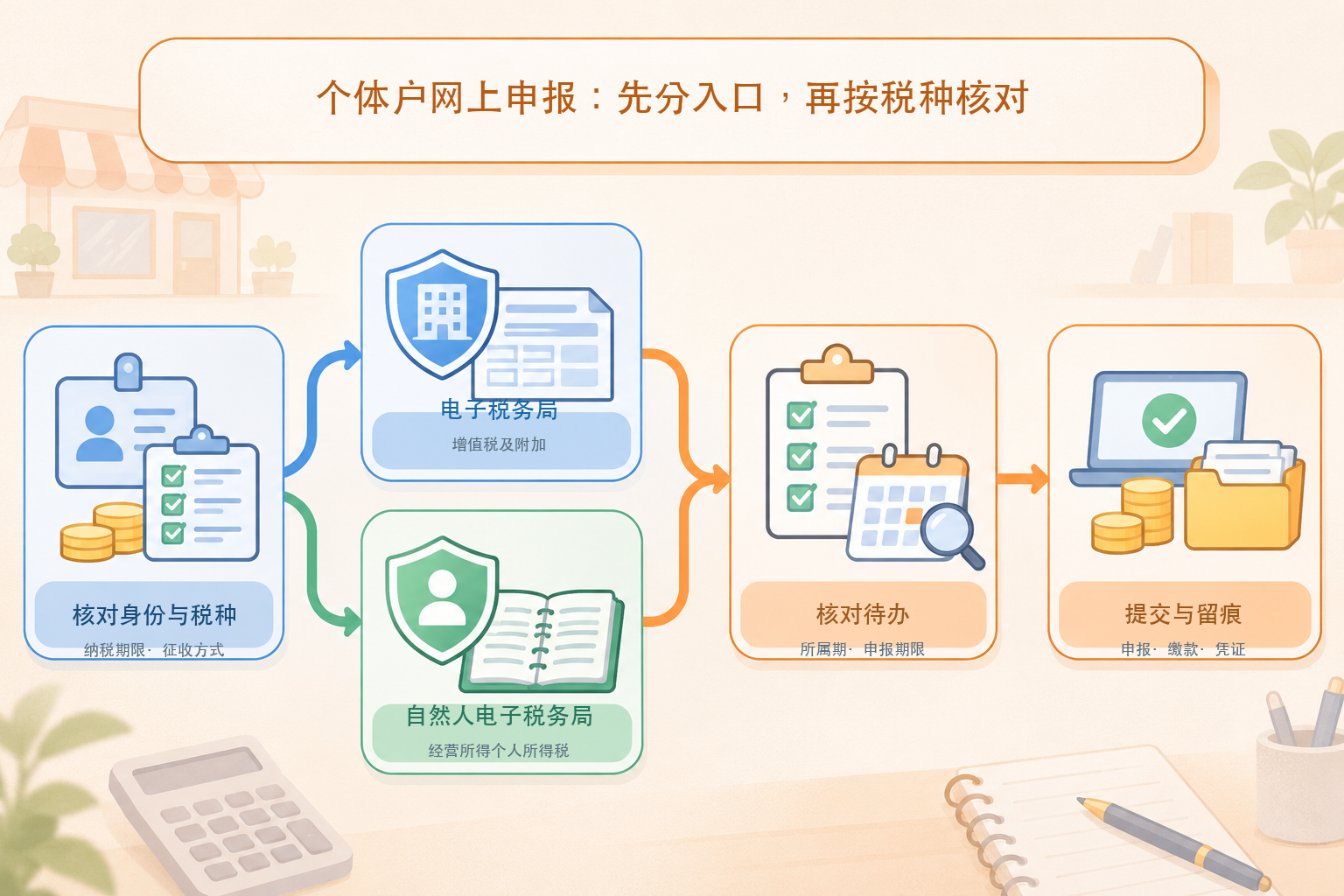
▍Step 1: Verify status, collection method, and filing deadline
First confirm VAT general taxpayer or small-scale taxpayer status, monthly or quarterly tax payment, whether individual income tax is under audit-based or deemed collection, and the tax type registration and filing deadline in the Electronic Tax Bureau. The forms and operations for fixed-rate households, audit-based households, general taxpayers, and small-scale taxpayers cannot be copied from one another. Do not infer all tax types from the mere words "sole proprietor."
▍Step 2: Align business data for the period
Collect the current period's sales revenue, un-invoiced revenue, red-letter or voided transactions, costs and expenses, bank receipts and payments, and related vouchers, and reconcile invoices against actual transactions. OCR recognition, automatic invoice retrieval, or pre-filled data only solve the collection problem; they do not mean accounting entry, tax amount determination, or tax filing has been completed. System pre-filling must also be reviewed against the books and actual business.
▍Step 3: Handle VAT and surcharges in the Electronic Tax Bureau
Enter the electronic tax bureau through the official website of the tax authority where the enterprise is located, verify the official domain name, enterprise identity, and current period, and then check "My To-Dos" or the tax declaration module. When filing VAT, distinguish threshold exemption, reduction, waiver of preference, and other taxable items. Surcharges are usually linked to the VAT filing result, but the system-generated data should still be checked. Menu names may be adjusted in different provinces; the local actual interface prevails.
▍Step 4: Handle individual income tax on business income in the Natural Person Electronic Tax Bureau
Public guidance from national tax authorities shows that owners or investors can log in to the Natural Person Electronic Tax Bureau web portal to file business income; tax personnel can also handle it on their behalf through "Unit Tax Handling - Business Income" or the Natural Person Electronic Tax Bureau withholding client. Common forms include Form A for monthly (quarterly) prepayment, Form B for annual settlement under audit-based collection, and Form C for annual consolidation when business income is obtained from two or more places. Which form to file depends on the collection method, filing period, and business situation.
▍Step 5: Submit, pay, and save verifiable evidence
Before submission, review the taxpayer name, period, revenue and costs, preferential items, and tax payable. After submission, check the filing status and pay tax using the valid method provided by the system. After completion, save the declaration form, payment or tax payment vouchers, system receipts, and corresponding books. If the status still shows "pending declaration," the deduction fails, or the data is inconsistent with the books, do not simply click submit repeatedly; first identify the cause of failure and correct it according to local system guidance.
▍Three checks that are easily missed
First, invoiced revenue does not equal all revenue that should be declared; un-invoiced revenue and other taxable transactions must also be handled according to regulations. Second, VAT exemption does not equal exemption from individual income tax on business income; the tax bases and preferential conditions of the two types of tax differ. Third, not every individual business involves only VAT and individual income tax on business income; whether consumption tax, property tax, urban land use tax, stamp duty, cultural undertaking construction fee, and others must be declared depends on the actual business and tax type determination, and a generic checklist cannot be copied.
▍Where software fits in the process
Invoice collection, invoicing, accounting archives, and filing management tools are suitable for pre-filing data organization, cross-form reconciliation, anomaly alerts, and document retention, but they should not be described as "recognition equals booking" or "direct connection to the tax bureau without login can replace filing." The interfaces, automatic data retrieval, filing, and archiving scope of Kailing Technology's related solutions are subject to the actual version, lawful authorization, demonstration, contract, and delivery list.
Official basis:Tax authority response on online filing channels for business incomeExplain that business owners can file by themselves through the web portal of the Individual Income Tax Electronic Tax Bureau, and tax handlers can file on their behalf through the web portal or the withholding client;Tax authority guidelines for business income filingList Form A, Form B, and related online handling paths.
Keywords: individual business online filing, sole proprietor tax filing, Electronic Tax Bureau, Natural Person Electronic Tax Bureau, VAT filing, individual income tax on business income, Form A, Form B, Form C, Kailing Technology
As a comprehensive business-finance-tax digitalization solution service provider, Kailing Technology provides business-finance-tax management digital transformation products and operational services for various government agencies, institutions, and large, medium, and small enterprises. The product line includes: solutions for sales contract management system, procurement contract management system, fully digitalized Leqi interface project, automatic output invoicing system, reverse invoicing system, invoice issuance for individuals system, employee expense control and reimbursement system, input VAT invoice management system, supply chain collaborative reconciliation system, image AI OCR recognition system, automatic financial bookkeeping system, electronic accounting archives system, etc., comprehensively driving the digitalization process across various fields.
Consultation Hotline: 18513895936 / 010-60974119 Location: Beijing