
How do input VAT invoices enter the certification system? Five-step verification for 2026 deduction selection

How do input VAT invoices enter the certification system? Five-step verification for 2026 deduction selection
In 2026, what enterprises call "input VAT invoice certification" generally refers to general VAT taxpayers confirming the deduction purpose in the "invoice selection and confirmation" module of the electronic tax bureau. The complete process is not simply selecting invoices and submitting them; it involves confirming the tax period, querying eligible input vouchers, verifying status and choosing the purpose, completing statistical checks, and finally confirming the signature and syncing the filing data.
Menu names and page layouts of electronic tax bureaus may be adjusted in different regions, but the business logic is basically the same. Enterprises should also distinguish three things: invoice verification is used to check authenticity and status, invoice entry is used for accounting records, and deduction selection is used to confirm the VAT purpose; the three can be linked but cannot replace each other.
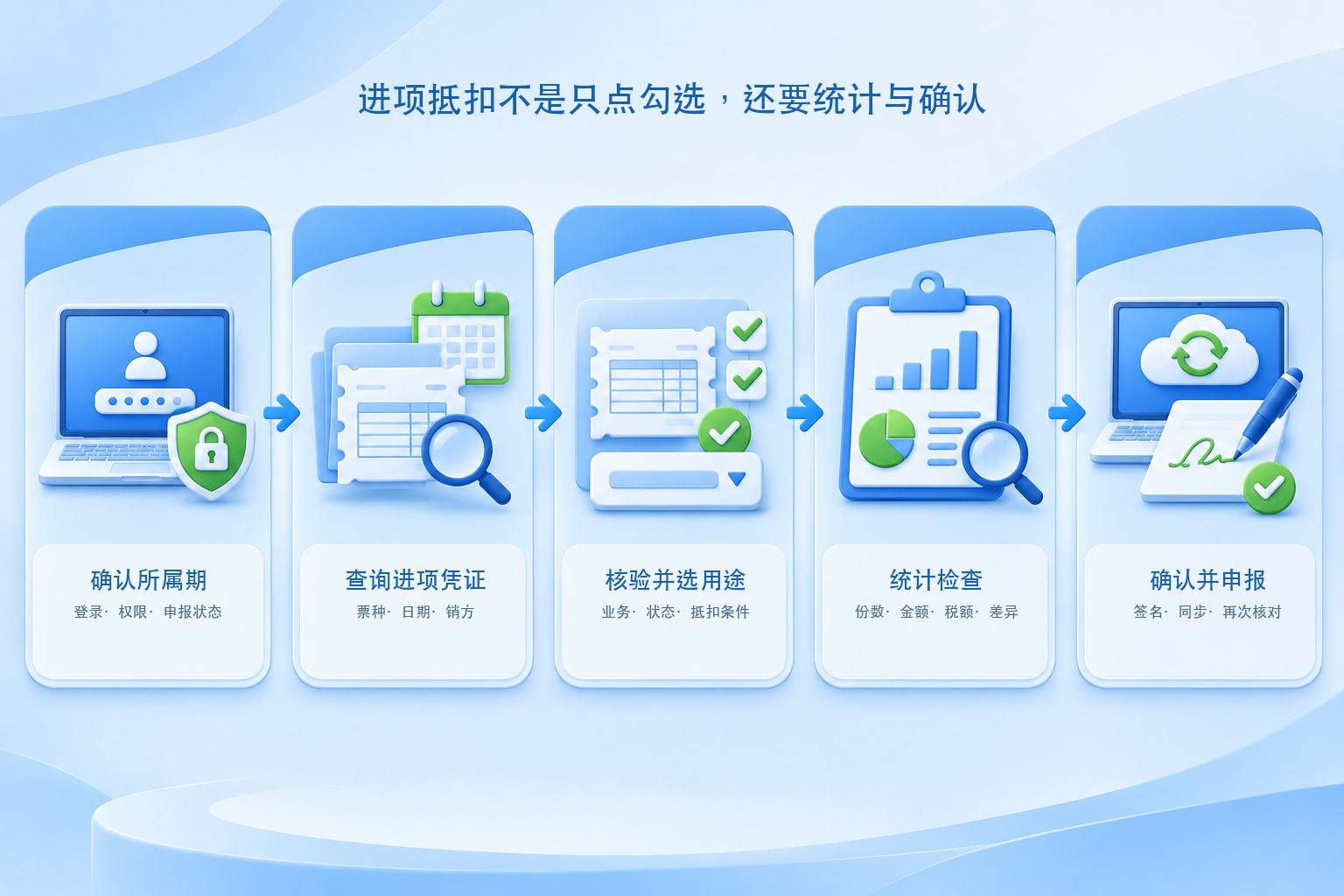
▍Step 1: Log in to the electronic tax bureau and confirm the current tax period
Personnel with the corresponding permissions log in to the electronic tax bureau and enter entries such as "Invoice Business - Invoice Selection Confirmation - Deduction-type Selection." After entering the page, first check the current tax period and filing status; do not operate solely based on the invoice issuance date. If a filing has already been made, or if the tax period needs to be rolled back or the selection needs to be revoked, handle it according to the system status and the guidance of the competent tax authority, and avoid repeatedly voiding filings on your own.
▍Step 2: Query eligible input vouchers for the current period
Pending selection data can be queried by invoice date, seller information, invoice number, or voucher type. The deduction scope is not limited to one type of electronic invoice; it may specifically include eligible VAT special invoices, unified motor vehicle sales invoices, customs payment documents, and other input vouchers. If a certain invoice is not displayed on the page, first check the buyer information, invoice status, synchronization time, purpose status, and voucher type, rather than directly concluding that the "invoice is lost."
▍Step 3: Verify the business, invoice face and status, then choose the deduction purpose
Before selection, check whether the invoice is consistent with the contract, procurement, acceptance, payment, or reimbursement materials, and pay attention to voided invoices, red-letter reversals, abnormal vouchers, and purpose conflicts. An invoice appearing in the system does not mean it is automatically deductible; passing verification does not mean accounting entry has been completed. Only vouchers that meet current deduction conditions and reflect real business should be selected for deduction according to their actual purpose.
▍Step 4: Complete statistics and handle discrepancies
After selection, enter the statistics or statistical confirmation stage and check the number of invoices, amount, tax amount, and abnormal prompts. Enterprises should reconcile statistical results with procurement, payables, reimbursement, and accounting books, and check for duplicate entries, unsynced red-letter reversals, invoice-goods mismatches, or items that should not be deducted in the current period. Financial review cannot be omitted just because the system has generated a statistical table.
▍Step 5: Confirm the signature and reconcile with the VAT filing data
After the statistics are confirmed correct, confirm the signature according to the system process so that the selection results enter the current period's filing data. Before filing, recheck the selection statistics against the relevant columns of the filing form; if missed or incorrect selections are discovered after filing, handle rollback, revocation, or subsequent processing according to tax authority guidance based on whether payment has been made, the status of the tax period, and local electronic tax bureau functions. The original draft's statement that "overdue items can only be left to subsequent periods" is too absolute; actual handling depends on the voucher type, filing status, and system rules.
▍Which steps can an input VAT invoice management system assist with?
Kailing Technology's input VAT invoice management solutions can, within the scope of lawful authorization, open interfaces, and project configuration, assist in collecting invoices, verification and duplicate checking, linking business documents, generating selection lists, and recording processing status. OCR extraction is only field recognition and cannot be equated with booking or deduction; "supports integration" also does not mean that selection can be completed automatically in all regions, invoice types, and versions. During implementation, permission controls, manual review, exception rollback, and operation logs should be retained, and capability boundaries should be confirmed through actual demonstrations, contracts, and delivery checklists.
Official basis:Tax authority 2026 guidance on deduction selection operations in the electronic tax bureauSummarize the process as selection, statistics, signature confirmation, and syncing the filing data;Tax authority reply on missed selections discovered after filingExplains that the handling method depends on the filing and payment status. Page entries may be updated; when processing, the actual interface of the electronic tax bureau in the enterprise's region shall prevail.
Keywords: Input VAT invoice certification, deduction selection, invoice purpose confirmation, tax digital account, statistical confirmation, confirmation signature, VAT filing, Kailing Technology
As a comprehensive business-finance-tax digitalization solution service provider, Kailing Technology provides business-finance-tax management digital transformation products and operational services for various government agencies, institutions, and large, medium, and small enterprises. The product line includes: solutions for sales contract management system, procurement contract management system, fully digitalized Leqi interface project, automatic output invoicing system, reverse invoicing system, invoice issuance for individuals system, employee expense control and reimbursement system, input VAT invoice management system, supply chain collaborative reconciliation system, image AI OCR recognition system, automatic financial bookkeeping system, electronic accounting archives system, etc., comprehensively driving the digitalization process across various fields.
Consultation Hotline: 18513895936 / 010-60974119 Location: Beijing