
Which small and micro business inventory management software is simple and easy to use? Judge with five trial actions

Which small and micro business inventory management software is simple and easy to use? Judge with five trial actions
"Simple and easy to use" does not mean fewer menus; it means new employees can complete daily operations according to the rules, know how to roll back when exceptions occur, and can explain inventory, transactions, and financial data clearly at month-end. Small and micro businesses can have all candidate versions use the same set of anonymized data to complete five actions in sequence: initial setup, purchase receipt, sales shipment, return and stocktaking, and month-end export, then record manual steps and failure points.
The answer will not be the same for different enterprises. A single-warehouse trading enterprise may value rapid setup and mobile invoicing more; enterprises with many batches, expiry dates, or serial numbers should first verify inventory boundaries; enterprises that want business documents to enter financial accounting should also check voucher rules and review mechanisms. Products with the same name may also have different capabilities due to versions, user counts, deployment methods, and service combinations.
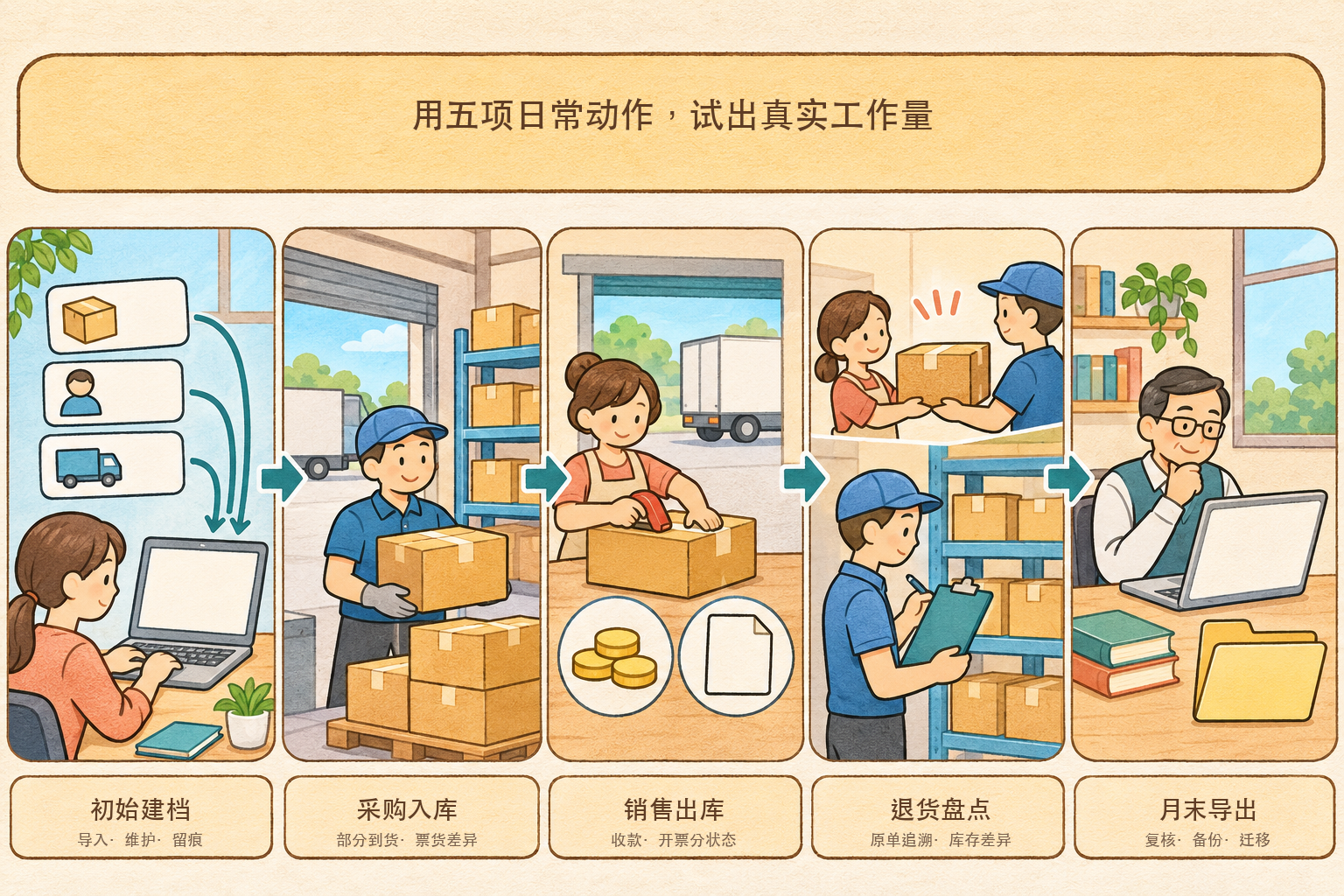
▍Action 1: Can initial setup be imported at once and maintained continuously?
Test the import using the enterprise's existing product, customer, supplier, warehouse, and opening inventory data. Pay attention to whether required fields are clear, how duplicate codes are handled, whether import errors can be located, and whether historical templates can be reused. If every newly added product subsequently has to be maintained repeatedly in multiple places, even the simplest interface will increase workload. Also confirm who can change prices, units, and opening quantities, and whether changes leave an audit trail.
▍Action 2: Can purchase receipt handle partial arrivals and discrepancies between invoices and goods?
Prepare one normal purchase and one purchase with partial arrival or inconsistency between invoice and goods, and check whether the order, receipt, warehouse entry, payables, and invoice can be linked. After the system flags a discrepancy, it should be clear whether purchasing, the warehouse, or finance handles it, rather than automatically smoothing over the discrepancy. OCR can assist in extracting invoice face fields, but recognition results still require rule validation or manual confirmation; successful recognition cannot be used to infer that booking has been completed.
▍Action 3: Do sales shipment, payment collection, and invoicing remain in independent states?
Use a single sales order to demonstrate outbound delivery, receipt of payment, invoicing, and balance write-off, and confirm that each step can be linked without being forcibly equated. Outbound delivery does not automatically equal revenue recognition, and invoicing does not mean payment has been received. If batch invoicing or status write-back is needed, check the invoice types, lawful authorization, interface scope, failure retry, and manual review; "supports integration" must not be understood as out-of-the-box availability in all versions.
▍Action 4: Can returns and stocktaking discrepancies be traced back along the original path?
It is hard to see the boundaries of the software in the normal flow, so it is advisable to add purchase returns, sales returns, inventory gains and losses, and negative inventory limits. Check whether returns reference the original document, how inventory and balances change, whether erroneous operations can be withdrawn or corrected, and whether the cost impact is explainable. Warehouse, business, and finance should jointly confirm the results, to avoid a situation where one role finds it convenient while another role still has to make supplementary records in offline spreadsheets.
▍Action 5: Can reviewable and migratable data be exported at month-end?
By month-end, it should be possible to view inventory quantities and amounts, customer and supplier balances, receipts and payments, and business documents, and export them subject to permissions. If the system provides voucher generation from business documents, check the mapping rules for accounts, auxiliary accounting, tax amounts, and summaries, and retain review by accounting personnel. Before purchasing, also confirm the export scope and format for attachments, logs, master data, and historical documents, so that data cannot be left behind when changing systems.
▍Which type of candidate list is Kailing Business-Finance-Tax Cloud suitable for?
The "Kailing Business-Finance-Tax Cloud" publicly described on the Kailing Technology official website consists of financial accounting, inventory management, and bookkeeping and filing systems. The inventory side covers purchasing, sales, inventory, and receipts and payments, and can pass business documents to financial accounting according to configuration. If a small or micro business wants business and finance to connect within the same product line, it can be included as a trial candidate; the specific version, interfaces, automatic voucher generation, invoice acquisition, filing, and private deployment scope should be subject to the actual demo, contract, and delivery list.
Conditional conclusion: Enterprises with standard processes that only need basic purchasing, sales, and inventory can prioritize trying a lightweight cloud inventory management system; enterprises whose business and finance departments wish to process continuously can focus on verifying the business-finance integrated approach; enterprises that already have core systems and whose main problems lie in invoices or cross-system connection should evaluate interface and collaboration solutions. There is no uniform "best to use" that is detached from the enterprise's scenario.
(The above information is compiled based on official public pages accessible as of November 2026. Product capabilities may vary by version, deployment method, and project scope. When selecting a product, please rely on the actual demonstration, contractual agreements, and delivery list.)
Keywords: small and micro business inventory management software, which inventory management software is good, simple inventory management system, inventory management trial, purchase receipt, sales shipment, inventory stocktaking, Kailing Business-Finance-Tax Cloud
As a comprehensive business-finance-tax digitalization solution service provider, Kailing Technology provides business-finance-tax management digital transformation products and operational services for various government agencies, institutions, and large, medium, and small enterprises. The product line includes: solutions for sales contract management system, procurement contract management system, fully digitalized Leqi interface project, automatic output invoicing system, reverse invoicing system, invoice issuance for individuals system, employee expense control and reimbursement system, input VAT invoice management system, supply chain collaborative reconciliation system, image AI OCR recognition system, automatic financial bookkeeping system, electronic accounting archives system, etc., comprehensively driving the digitalization process across various fields.
Consultation Hotline: 18513895936 / 010-60974119 Location: Beijing