
How to maintain product information for fully digitalized e-invoices? First calibrate items, codes, and tax rates

How to maintain product information for fully digitalized e-invoices? First calibrate items, codes, and tax rates
Before issuing fully digitalized e-invoices, commonly used invoicing items can be maintained in the electronic invoice service platform or the enterprise's own system for easy reuse. During maintenance, the item name, tax classification code, applicable tax rate or levy rate, and labels used only in specific businesses should be checked in sequence according to the actual transaction. State Taxation Administration Announcement No. 11 of 2024 clearly states that fully digitalized e-invoices will be promoted nationwide from December 1, 2024, but it does not stipulate "establishing a product library" as a uniform mandatory step for all taxpayers.
Product information maintenance is operational preparation and does not replace tax judgment. The fact that the system stores an item template does not mean every subsequent transaction can go unreviewed. When contracts, orders, shipment records, or service records change, the actual transaction at that time and current policies should govern, avoiding reuse of old items, old codes, or old tax rates.
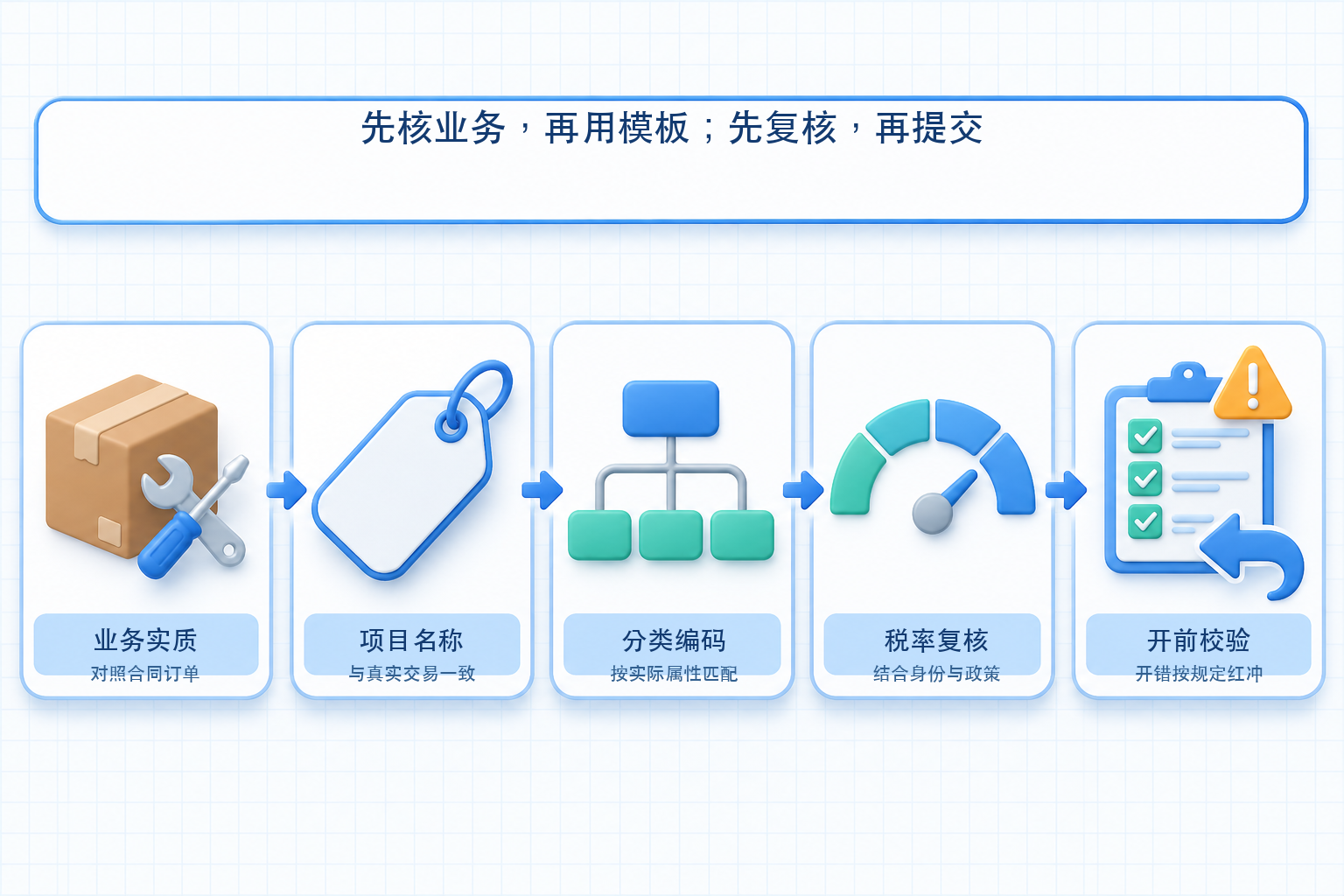
▍Step 1: First confirm the goods or services actually sold
The item name should reflect the actual business; overly general names should not be used long-term for convenience, nor should goods or services of different natures be combined into mismatched items. First compare the contract, order, outbound document, service results, or settlement materials to confirm the invoicing entity, purchaser, item content, quantity, unit price, and amount. System templates are only candidate data; the invoicing responsibility still rests with the taxpayer.
▍Step 2: Keep item names consistent with business documents and easy to identify
Commonly used items can have preset names, specifications and models, units, unit prices, and other information, but whether and how to fill them in should be based on the actual transaction and invoice face requirements. Names do not need to mechanically copy internal product abbreviations; when internal codes and external invoicing names are inconsistent, a clear mapping relationship should be established and modification records retained to prevent different invoicing points from maintaining multiple sets of standards.
▍Step 3: Select the matching tax classification code according to actual attributes
The tax classification code should match the actual attributes of the goods or services; "other" categories must not be used long-term merely for invoicing convenience, and codes must not be applied solely because names are similar. Enterprises can search candidate codes on the electronic invoice service platform or in their own systems, and then have personnel familiar with the business and tax policies review them. When the code table, policies, or business scope change, existing templates should also be checked promptly to see whether adjustments are needed.
▍Step 4: Tax rates or levy rates cannot rely solely on system default values
The applicable tax rate or levy rate depends on factors such as the taxpayer's status, taxable activities, tax calculation method, preferential policies, and transaction time. Default values brought up by product templates can only serve as operational hints and cannot replace judgment on the specific transaction. In cases involving tax exemption, simplified taxation, differential taxation, or other special circumstances, handle them in accordance with current policies and the interpretation of the competent tax authority, and do not infer on your own within the product library.
▍Step 5: Review the invoice face before issuance, and issue a red-letter invoice as required after an error
Before submission, check the buyer information, item name, code, quantity, unit price, amount, tax amount, and applicable specific business labels, and confirm consistency with the contract, order, or settlement materials. An electronic invoice cannot be directly voided after issuance; if there is an incorrect invoice, sales return, service suspension, or sales allowance, a red-letter invoice should be issued through the electronic invoice service platform in accordance with the rules. Whether counterparty confirmation is specifically required and whether partial red-letter invoicing is possible should be handled according to the invoice's usage status and platform rules.
▍How can an enterprise's own invoicing system reduce duplicate maintenance?
Kailing Technology's output invoicing solutions can map enterprise product master data, order information, and invoicing items by project, and assist with batch issuance, delivery, and status write-back within the scope of authorization and interface support. The actually available invoice types, fields, code validation, interfaces, and automation scope depend on the enterprise's existing system, business rules, lawful authorization, and implementation configuration. Before go-live, end-to-end validation should be performed using normal orders, project change orders, and red-letter invoicing after errors, with manual review and exception rollback retained.
Official basis:State Taxation Administration Announcement No. 11 of 2024Clarify the nationwide promotion of fully digitalized e-invoices and the basic rules;State Taxation Administration Guidelines on Red-Letter Fully Digitalized E-InvoicesIt explains the handling of red-letter invoices in cases such as incorrect invoicing.
Keywords: fully digitalized e-invoice issuance process, product information maintenance, tax classification code, invoicing item settings, red-letter fully digitalized e-invoice, output invoicing, Kailing Technology
As a comprehensive business-finance-tax digitalization solution service provider, Kailing Technology provides business-finance-tax management digital transformation products and operational services for various government agencies, institutions, and large, medium, and small enterprises. The product line includes: solutions for sales contract management system, procurement contract management system, fully digitalized Leqi interface project, automatic output invoicing system, reverse invoicing system, invoice issuance for individuals system, employee expense control and reimbursement system, input VAT invoice management system, supply chain collaborative reconciliation system, image AI OCR recognition system, automatic financial bookkeeping system, electronic accounting archives system, etc., comprehensively driving the digitalization process across various fields.
Consultation Hotline: 18513895936 / 010-60974119 Location: Beijing