
Video tutorial on the invoicing process for sole proprietors: 2026 fully digitalized e-invoice 3-step practical guide to avoiding pitfalls

Video tutorial on the invoicing process for sole proprietors: 2026 fully digitalized e-invoice 3-step practical guide to avoiding pitfalls
When filming a video on invoicing for individual businesses, the most practical method is not to explain casually while operating, but to first write a reviewable storyboard script. The opening states the applicable audience and recording date; the main body then shows pre-invoicing checks, blue-letter invoice filling, and delivery inquiry in sequence; the ending adds insufficient quota, validation failure, red-letter processing, and electronic file retention. This way, viewers can follow the main workflow and also know where to verify when their interface differs.
A reliable tutorial must answer at the same time: where to start, what counts as success, and how to continue after an error.
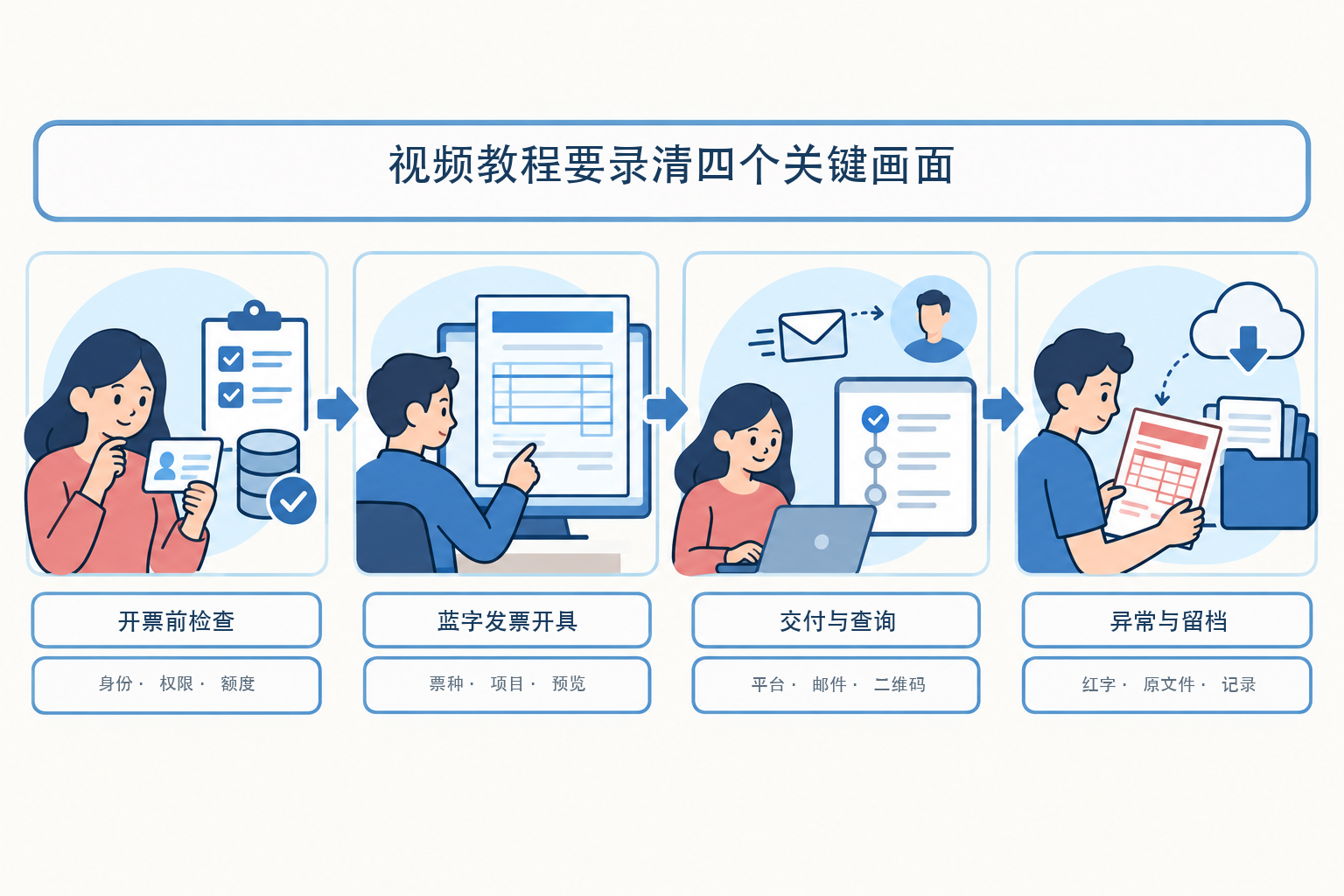
▍1. First write the four-frame storyboard, then open the screen recording software
The first section is called "Pre-invoicing checks," and the screen shows only entity switching, real-name relationships, and available quota; the second section is called "Blue-letter invoice issuance," fully retaining invoice type selection, item filling, preview, and confirmation; the third section is called "Delivery and inquiry," explaining where the invoice goes and its final status; the fourth section is called "Exceptions and archiving," covering failure prompts, the red-letter entry point, and original electronic files. Each of the four sections has its own start conditions and end markers, so key nodes will not be missed during post-editing.
Mark the region, electronic tax bureau page version and recording date in the lower right corner of the storyboard. Although fully digitalized e-invoices have been rolled out nationwide, the menu layout, identity verification and specific business tags may be adjusted. The video title can retain "2026", but the images must not imply that button positions will remain unchanged forever; after publishing, regularly check whether the page has been updated.
▍2. Shot 1 only captures the check results, without exposing real tax-handling materials
After screen recording starts, first confirm that the correct business entity is currently logged in, and show the personnel relationship status and invoice business permissions. The operator, finance officer, tax handler, or invoicing clerk should be authorized through a formal relationship, and invoices should be issued after the real-name tax handler completes identity verification. If a menu is missing, the subtitles should prompt viewers to maintain the personnel relationship or verify with the competent tax authority, and should not replace formal handling with unverified tips such as "it will appear after refreshing a few times."
Then locate the total invoice quota and remaining quota. Use one sentence in the subtitles to distinguish the concepts: "The quota governs how much can be invoiced this month; the threshold governs how VAT is paid when sales reach a certain level." The current threshold is based on Ministry of Finance and State Taxation Administration Announcement No. 10 of 2026, judged separately by month, quarter, and transaction. The tutorial can put policy links in the description instead of stuffing long provisions into the operation screen.
Entity names, identification numbers, personal names, mobile numbers, addresses, bank accounts, invoice numbers, amounts, and QR codes appearing in the footage must be masked frame by frame. It is best to use specially prepared desensitized demonstration materials; if there is no safe demonstration environment, explain the logic with static flowcharts. AI-generated fake electronic tax bureau screenshots must not be used to impersonate official pages.
▍3. Shot 2 follows "select—fill in—preview—confirm" in one continuous take
The formal operation section enters the blue-letter invoice issuance module from "Invoice Business." First select the invoice type and invoice category label, then fill in the buyer, goods or service items, quantity and amount, tax rate or levy rate, and remarks. After each group of fields is completed, the voiceover explains which type of business material it corresponds to, such as contracts, orders, receipts and payments, or delivery records; do not demonstrate item names unrelated to the actual transaction in the tutorial.
Be sure to keep the preview screen after filling it in. Use the magnifier box to check the buyer information, item name, tax-inclusive basis, tax rate and remarks in sequence, then issue. The screen should wait until the platform completes validation and shows a clear result; do not edit "submitted" into "issued". If the network is slow, first go to the query page to verify, and retry only after confirming that no invoice was generated.
For specific businesses such as transportation, construction, real estate, and agricultural product procurement, make separate topic videos. The general demonstration only explains how to identify and select the correct label, and does not mix all invoice types in one short video, so viewers do not misuse fields or tax classifications.
▍4. Shot 3 separates the three statuses: submitted, issued, delivered
Fully digitalized e-invoices can be automatically delivered by the electronic invoice service platform, or provided to the recipient by email, QR code, or download and print. The tutorial should first confirm the issuance status returned by the tax platform in invoice inquiry, then demonstrate selecting a delivery channel, and finally explain how to re-query or download. The business system showing submission succeeded, the tax platform returning issuance succeeded, and the buyer receiving the file are three different statuses.
When high-frequency invoicing enterprises use Kailing Technology's output VAT invoicing management platform, they can convert orders or contracts into applications, and after approval and validation, connect to the tax channel already determined by the enterprise and write invoice status back to the business system. The video should show status transitions and must not promise that all entities can skip login or that all orders require no manual review; authentication methods, interface scope, and exception takeover are subject to the enterprise's qualifications and implementation plan.
▍5. Abnormal shots are more worth keeping than success shots
Prepare at least three short clips: when the quota is insufficient, check the system prompt and apply for adjustment as required; when required fields or item codes fail validation, return to correct them; when returns, service termination, discounts, or invoice errors occur after issuance, enter the red-letter process. Red-letter processing must be linked to the original blue-letter invoice and business basis, and whether the recipient has confirmed the purpose may also affect the handling steps. It must not be replaced with footage of deleting records or issuing a separate negative invoice.
Subtitles should avoid promises such as "click here and it will definitely succeed" or "complete everything in three minutes". When encountering regional differences or policy boundaries, uniformly prompt at the end of the video to confirm through the electronic tax bureau, 12366 or the competent tax authority, and put the official links in the video description.
▍6. The archiving segment should capture electronic originals and their relationships
The final screen shows how to save electronic invoices by period and establish retrieval relationships with orders, contracts, receipts and payments, delivery, and accounting vouchers. Caihui [2020] No. 6 requires electronic accounting vouchers to be lawful and authentic, transmitted and stored securely and reliably, capable of reading relevant information, and protected against duplicate booking; when paper printouts are used as the basis, the electronic vouchers must still be saved simultaneously.
The Kailing Technology electronic accounting archives management system can receive invoices, vouchers, receipts, and business documents within the project scope, and supports recognition, linking, retrieval, borrowing, and operation records. AI OCR can extract invoice fields and provide structured data, but recognition results still require rule checks and manual review. The tutorial must not edit it into a claim that "after uploading images, bookkeeping and tax filing are completed automatically."
▍7. Do a frame-by-frame security check before publishing
Turn off browser autofill and message notifications, and check the screen recording cache, editing project, cover thumbnail and exported video. If any frame shows a complete account, ID document, mobile phone number, tax number, invoice number, address, amount, bank information or QR code, it should be covered again. The policy numbers, menu names and links in the subtitles should be checked word by word; after the page is revised, the video should be updated or the differences noted in the description.
▍FAQ 1: Can AI-generated images of the electronic tax bureau operation screen be used directly?
Generated images must not be passed off as the real official system. Unbranded flowcharts can be used to explain the steps; specific buttons should come from a real, desensitized operating environment that is permitted to be shown.
▍FAQ 2: Is it enough for one video to only show the success path?
Not enough. At least add the entry points for missing permissions, insufficient quota, validation failure and red-letter processing; otherwise viewers cannot continue when they encounter the most common problems.
▍FAQ 3: Can batch invoicing be done completely without review?
Approval or spot checks should be set according to enterprise internal controls, business rules, and risk levels. Automation reduces duplicate entry, but it does not transfer responsibility for transaction authenticity, invoice accuracy, or real-name authorization.
Official basis:State Taxation Administration Announcement No. 11 of 2024、Blue-letter invoice issuance operation instructions、Ministry of Finance and State Taxation Administration Announcement No. 10 of 2026、Q&A on compliant invoice issuance、Caihui [2020] No. 6。
To integrate high-frequency invoicing, delivery, and archiving into enterprise processes, visit: www.kailingteck.com .
About Kailing Technology
As a national high-tech enterprise, Kailing Technology focuses on the digital and intelligent transformation of enterprise business-finance-tax and operations management, providing software products, system integration, implementation and delivery, and operational services for various government agencies, institutions, group enterprises, and SMEs.
The company has now formed ten core product lines, including: AI digital employee system, enterprise expense control management system, customer relationship management system, reverse invoicing management system, invoice issuance for individuals management system, electronic archives management system, tax fully digitalized e-invoice Leqi system, tax invoice management system, group tax filing system, and AI OCR recognition system. It is committed to connecting enterprise business, finance, tax, funds, and archive data to help customers improve operational efficiency, business-finance-tax compliance capabilities, and digital management levels.
If you have any business-finance-tax digital transformation needs, welcome to contact us. Beijing Kailing Technology will serve you wholeheartedly.
Keywords: Sole proprietor invoicing video tutorial, fully digitalized e-invoice operation tutorial, blue invoice issuance, electronic tax bureau, invoice delivery, red-letter invoice, Kailing Technology
As a comprehensive business-finance-tax digitalization solution service provider, Kailing Technology provides business-finance-tax management digital transformation products and operational services for various government agencies, institutions, and large, medium, and small enterprises. The product line includes: solutions for sales contract management system, procurement contract management system, fully digitalized Leqi interface project, automatic output invoicing system, reverse invoicing system, invoice issuance for individuals system, employee expense control and reimbursement system, input VAT invoice management system, supply chain collaborative reconciliation system, image AI OCR recognition system, automatic financial bookkeeping system, electronic accounting archives system, etc., comprehensively driving the digitalization process across various fields.
Consultation Hotline: 18513895936 / 010-60974119 Location: Beijing