
How to issue fully digitalized e-invoices? Five steps for blue-letter issuance and the boundaries of batch collaboration

How to issue fully digitalized e-invoices? Five steps for blue-letter issuance and the boundaries of batch collaboration
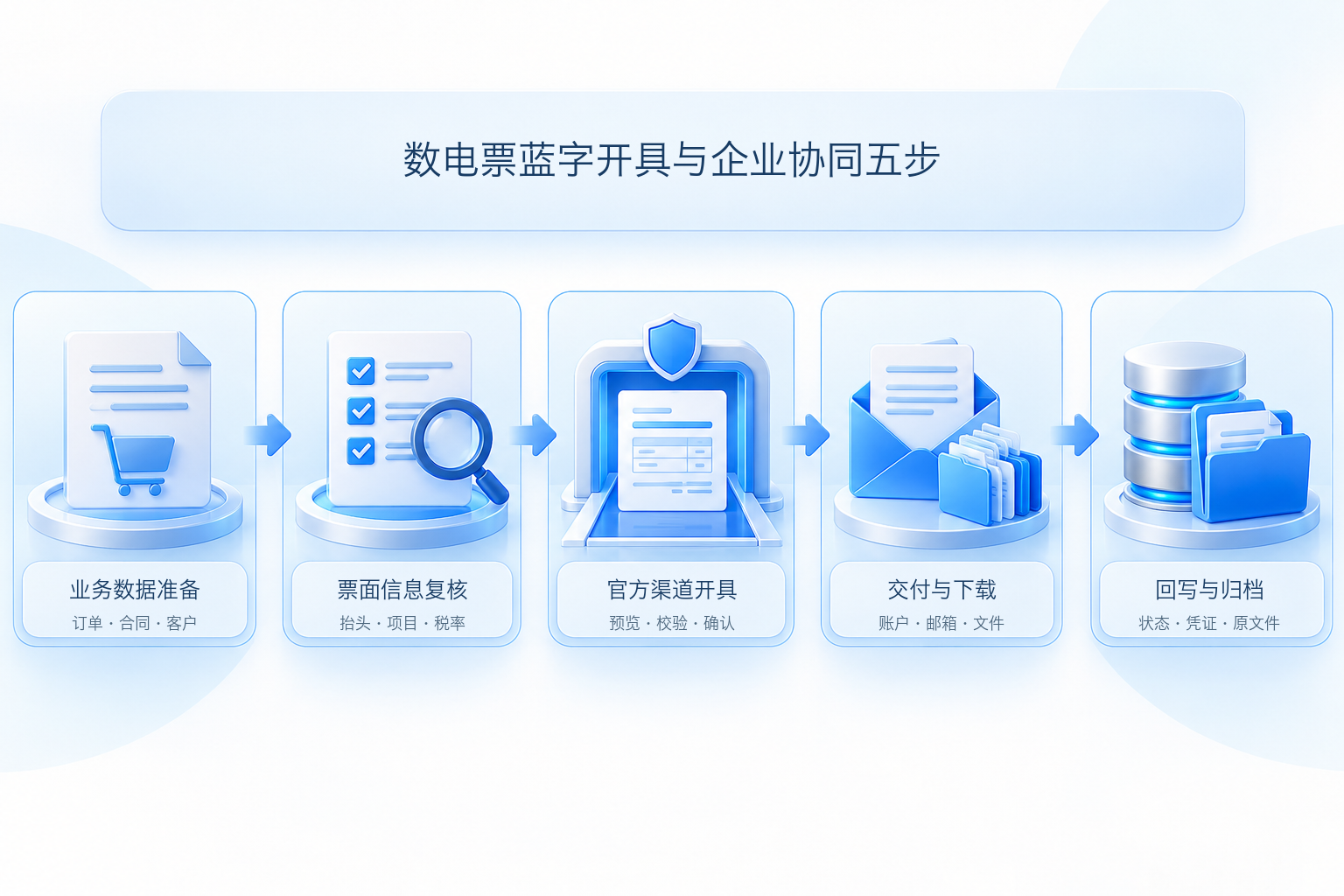
The official main workflow for blue-letter fully digitalized e-invoices is not complicated: prepare genuine business materials, enter the blue-letter invoice issuance module of the electronic tax bureau, fill in and review the invoice information, complete validation and issuance, then deliver, download, and save the electronic file. The truly error-prone part is not "which button to click," but whether the buyer information, item details, tax rate, specific business tags, and invoicing quota are consistent with the original business documents.
First ensure the transaction and invoice face are correct, then discuss batching and automation; system speed cannot bypass authorization, review, and exception handling. |
▍I. First verify the policy basis and operational entry point
The basis for the nationwide rollout of fully digitalized e-invoices isState Taxation Administration Announcement No. 11 of 2024the announcement number cited in the old draft is incorrect. The announcement clarifies that fully digitalized e-invoices are a type of electronic invoice, using nationwide unified coding, intelligently granting invoicing quotas, and circulating between tax collection and payment entities through methods such as the tax digital account.
The common path in the 2026 Electronic Tax Bureau is: after logging in to enterprise services, go to "I Want to Pay Taxes - Invoice Use - Invoice Issuance - Blue-Letter Invoice Issuance", then select "Issue Now". Regional page layouts may differ slightly, butCurrent tax authority operating instructionsAll require selecting the invoice type or invoice type tag, filling in the form, previewing, and confirming issuance. If the function is not visible, first check the tax handler's identity, invoicing permissions, and enterprise authorization.
▍II. Step 1: Prepare business data and invoicing conditions
Before invoicing, authentic and complete orders or contracts, delivery records, the buyer's name and unified social credit code, item names, quantities and amounts, applicable tax rates, and specific business information that needs to be filled in should be obtained. Businesses such as sales of real estate, construction services, transportation, and agricultural product procurement may have special tags and required fields, and ordinary commodity templates cannot be used instead.
Also check the current month's total invoice quota, the invoicer's permissions, and identity authentication status. Insufficient quota does not mean the transaction cannot occur; according to the Electronic Tax Bureau prompts, wait for system adjustment or apply for manual adjustment as required; management must not be circumvented by splitting fake transactions, borrowing other entities, or changing the invoicing period.
▍III. Step 2: Fill in and review the invoice face information
After entering blue-letter invoice issuance, select the invoice type and business tag, and enter information such as the buyer, item details, amount and tax, remarks, and handler. Customer or product records saved in the system can only serve as filling aids; the issuer should still verify the invoice item by item against the contract, order, and delivery facts. Pay particular attention to name and tax ID, tax-inclusive or tax-exclusive basis, goods and services codes, tax rate, discounts, and multi-rate splitting.
Use the preview function before clicking formal issuance.Tax authority explanation on the electronic tax bureau APPIt is shown that identity authentication may need to be completed as required when confirming issuance, and only after platform validation passes will issuance success be prompted. For failure prompts, the original information should be retained and the field, quota, permission, or network cause identified; do not repeatedly submit unconditionally.
▍IV. Step 3: Complete issuance through the officially authorized channel
For manual processing, the invoicer confirms issuance in the Electronic Tax Bureau; for enterprise batch scenarios, the batch function permitted by the tax authority or a legally connected interface channel should be used. Whichever method is used, the final result shall be based on the invoice number, issuance status, and electronic file returned by the tax platform. "Submitted" in the business system cannot be directly treated as "issued".
Kailing Technology's output VAT invoicing management platform can turn order, contract, or shipment data into invoicing applications, and connect approval, issuance, delivery, and result write-back according to the project plan. Enterprises should confirm before go-live whether to use the Electronic Tax Bureau, the fully digitalized e-invoice interface, or Leqi Direct Connection, and verify authorization conditions, field mapping, identity authentication methods, rate-limiting rules, and responsibility boundaries. Channels and enterprise qualifications differ, so fixed times, fixed numbers of invoices, or login-free operation in all scenarios cannot be promised.
▍V. Step 4: Deliver and save verifiable electronic files
After a fully digitalized e-invoice is successfully issued, the invoice information can be circulated through the tax digital account, or delivered via email, QR code, or download according to actual functions. PDF and OFD are convenient for viewing, while XML contains structured data and a digital signature; enterprises should determine the scope of retention according to accounting and archiving systems. Successful delivery, the counterparty having viewed it, and finance having booked it are three different statuses and should not be conflated.
Tax authority explanation on booking and archiving of fully digitalized e-invoicespoints out that the recipient may use the XML file containing a digital signature for reimbursement, bookkeeping, and archiving; if a PDF or OFD printout is used as the basis, the XML electronic file containing a digital signature should also be saved at the same time. BuildKailing Technology Electronic Accounting Archives Systemthey should accept original file capture, invoice-to-voucher linkage, four-property testing, borrowing permissions, and disposal audit trails, and must not directly equate "download successful" with "archiving compliance."
▍VI. Step 5: Write back the status, and be able to handle failures and red-letter invoices
The enterprise system should record the application number, original business document number, tax platform return status, invoice number, delivery result, and original file location. On interface timeout, query the final status first before deciding whether to retry, and use idempotency keys to avoid duplicate invoicing. The failure queue should retain the error reason, handler, and retry records, and must not only show "processing".
If sales returns, invoicing errors, service suspension, or sales allowances occur after a blue-letter fully digitalized e-invoice is issued, red-letter fully digitalized e-invoices should be handled in accordance with the provisions of Announcement No. 11 of 2024; the issued blue invoice cannot simply be deleted or treated as if it never occurred. Whether the buyer has confirmed the use affects the red-letter information confirmation process; enterprises should use samples of returns, partial allowances, and cross-period red-letter reversals for acceptance.
▍VII. Batch collaboration go-live acceptance checklist
| Step | Must verify | Cannot only look at |
| Business data retrieval | Original document, customer, project, tax rate, and permissions | Whether tables can be imported |
| Formal issuance | Authorization channel, validation results, and final status | Submission speed |
| Delivery and download | Account, email, file format, and failed resend | Page shows success |
| Write-back and archiving | Idempotency, original files, voucher relationships, and logs | Whether to generate PDF |
| Abnormal red-letter invoices | Returns, allowances, erroneous issuance, and cross-period handling | Normal blue invoice sample |
The unverified fixed time limits, batch scales, efficiency ratios, and automatic booking commitments in the old draft had no unified verifiable basis and have all been deleted. When enterprises evaluateKailing Technology's output invoicing management platformthey should rely on their own channel qualifications, interface scope, concurrency rules, sample acceptance, and contract delivery list.
Keywords: Fully digitalized e-invoice issuance steps, blue-letter invoice issuance, electronic tax bureau, batch invoicing, fully digitalized e-invoice delivery, fully digitalized e-invoice archiving, output invoicing
As a comprehensive business-finance-tax digitalization solution service provider, Kailing Technology provides business-finance-tax management digital transformation products and operational services for various government agencies, institutions, and large, medium, and small enterprises. The product line includes: solutions for sales contract management system, procurement contract management system, fully digitalized Leqi interface project, automatic output invoicing system, reverse invoicing system, invoice issuance for individuals system, employee expense control and reimbursement system, input VAT invoice management system, supply chain collaborative reconciliation system, image AI OCR recognition system, automatic financial bookkeeping system, electronic accounting archives system, etc., comprehensively driving the digitalization process across various fields.
Consultation Hotline: 18513895936 / 010-60974119 Location: Beijing