
How to download the input VAT invoice certification APP? First verify the official entry and the purpose confirmation chain

How to download the input VAT invoice certification APP? First verify the official entry and the purpose confirmation chain
When searching for "input VAT invoice certification APP download," the most important thing is not to first install software with a similar name, but to first verify the official tax-handling entry published by the tax authority of your province. When input VAT invoices are used for deduction, export tax refund, or tax refund on behalf of others, the purpose confirmation must be completed in the applicable tax digital account or the VAT Invoice Comprehensive Service Platform; enterprise internal tools can assist with invoice collection, verification, duplicate checking, and ledger management, but cannot replace the taxpayer's official purpose confirmation and filing responsibilities.
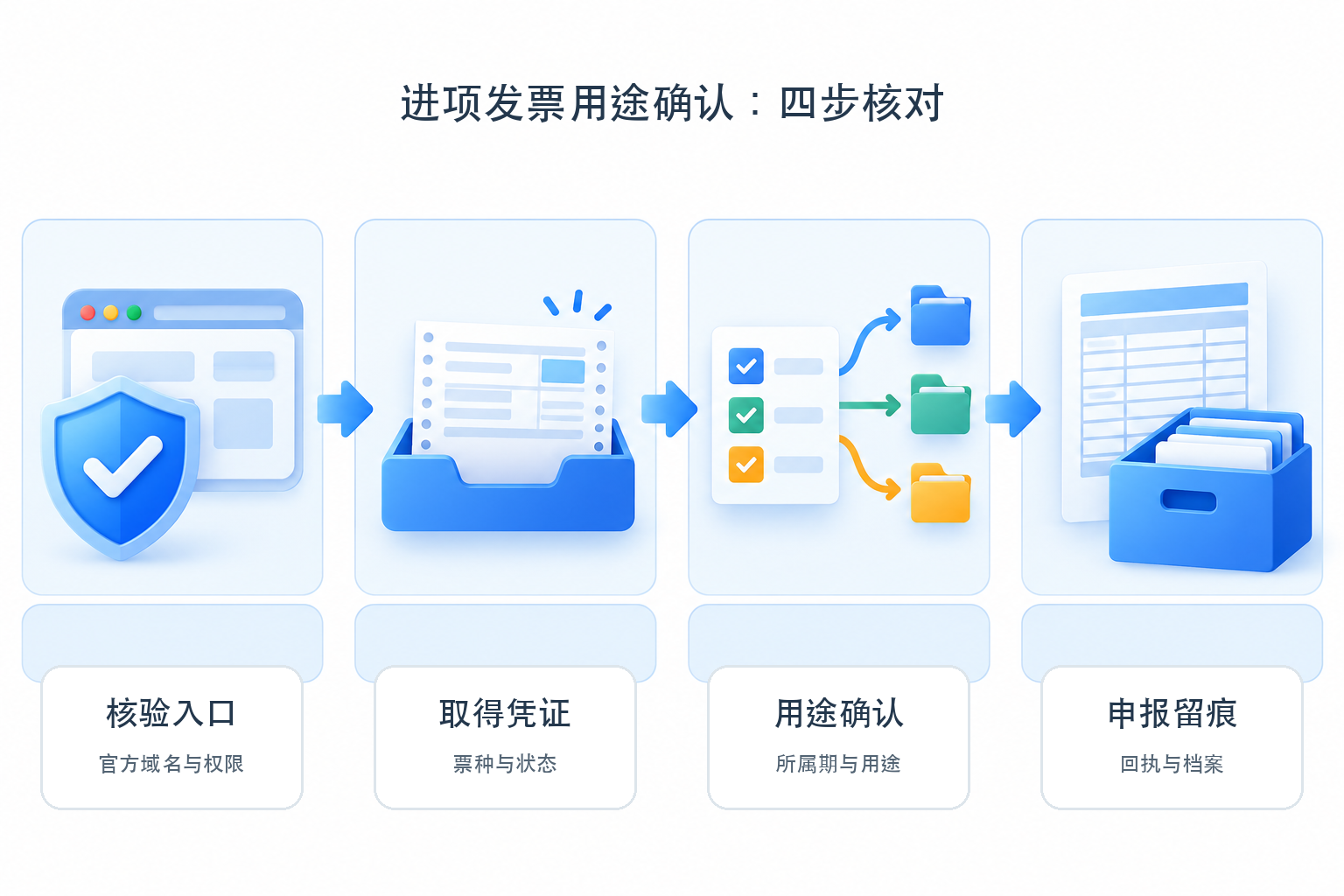
First verify the official domain and identity permissions, then check the invoice type, period, use and filing receipt; third-party tools are not the same as tax authority certification entry points. |
▍1. "Verification app" is not a unified official product name
State Taxation AdministrationAnnouncement on matters concerning the VAT Invoice Comprehensive Service Platform and othersIt is clear that taxpayers who obtain qualifying deduction vouchers and need to use them for filing deductions, export tax refunds, or tax refunds on behalf of others should log in to the VAT Invoice Comprehensive Service Platform to confirm the purpose; the login addresses of platforms in each region are determined and published by the provincial tax authorities. With the rollout of fully digitalized e-invoices, some taxpayers handle this through the tax digital account of the electronic tax bureau; taxpayers who have not used fully digitalized e-invoices may still use the VAT Invoice Comprehensive Service Platform.
Therefore, it is inappropriate to write broadly that "in 2026 everything will be merged into the electronic tax bureau and no independent entry point will be needed". The State Taxation Administration's provisions on use confirmation of fully digitalized e-invoicesOfficial Q&AIt also explains the two channels: the tax digital account and the comprehensive service platform. Enterprises should rely on the entry points, taxpayer status and actual functions currently published by the competent tax authority.
▍2. Complete four security checks before downloading or logging in
Verification entry: Enter through the tax authority's official website, the electronic tax bureau or an announcement by the competent tax authority; do not install software based on search ads, chat links or QR codes of unknown origin. Check the domain name, developer information, digital signature, permission requests and privacy statement, and do not submit tax numbers, account numbers, verification codes or certificate passwords to non-official pages.
Obtain vouchers: Verify the original electronic file of the invoice, invoice type, issuer, status, and business authenticity. Not every voucher bearing the word "invoice" is deductible, and obtaining one does not automatically put it into the current period's deduction.
Purpose confirmation: Select the purpose according to the applicable channel, such as deduction, export tax refund, or no deduction, and verify the tax period and selection results. If the wrong purpose is selected, a correction must be handled according to tax authority rules; it cannot be fixed by merely changing a label in the enterprise's internal system.
Filing records: After confirming the purpose, it still needs to be linked with filing forms, accounting treatment, and original vouchers, and the confirmation results, exception handling, and filing receipts should be retained. Successful confirmation does not mean the filing is complete, and internal ledgers do not equal the tax-side status.
▍3. What enterprise tools can and cannot do
Official page of Kailing input VAT invoice receipt management platformIt lists collection directions such as the tax bureau invoice pool, OCR, email and card wallet, as well as verification, duplicate checking and status linkage. Enterprises can use such tools to consolidate invoices, detect duplicates or anomalies, create to-dos and hand results to authorized personnel for review. The actually available entry points, invoice types, regions, authorization and interfaces are subject to the target version, project configuration and on-site demonstration.
Such tools cannot turn an invoice that does not meet deduction conditions into a deductible voucher, nor can they replace the taxpayer's purpose confirmation and filing on official channels. The unconditional statements in the original draft about full invoice source coverage, automatic booking, and inevitably avoiding missed deductions have all been deleted; invoice source completeness is affected by authorization, invoice type, status, interfaces, and business materials, and recognition results also require rule mapping and human review.
▍4. Retain manual review points from recognition to booking and archiving
Official page of Kailing AI OCRWhat is disclosed is the capability for visual extraction, structuring and export of invoices, contracts, licenses and other content. Forming accounting vouchers also requires account and auxiliary accounting rules, period control, exception handling, interfaces and confirmation by responsible personnel; "OCR recognition" cannot be directly equated with "already booked".
Official page of Kailing Electronic Accounting Archives SystemIt lists directions such as multi-source collection, recognition and classification, voucher linkage, four-property testing, borrowing and disposal. After electronic files enter the system, the originals, metadata, linkage relationships, permissions, logs and retention requirements should still be checked; "uploading or scanning" is not the same as automatically completing compliant archiving.
▍5. On-site acceptance checklist
| Step | Normal sample | Exception sample | Acceptance evidence |
| Entry point and authorization | Complete identity verification through the official entry point | Authorization expired, verification code invalid | Domain, permissions, logs and retry mechanism |
| Voucher acquisition | Originals, fields and business materials are consistent | Duplicates, missing fields, abnormal status | Original retention, verification results and to-dos |
| Purpose confirmation | Correct selection of the tax period and purpose | Incorrect selection or non-deductible | Tax-side results, correction paths, and review records |
| Filing and archiving | Linkage of filing forms, receipts, vouchers, and originals | Filing failed or attachments missing | Receipts, exception handling, metadata and export |
▍6. Conditional conclusion
If you are only looking for the input VAT invoice deduction entry point, prioritize the competent tax authority's official website and the electronic tax bureau, and do not treat vendor software as an official verification app; if the enterprise has many invoice sources and high duplicate-checking costs, you may evaluate input invoice collection and verification tools, but you must confirm on site the current version's entry points, invoice types, authorization, exception handling and data export; if accounting and archiving also need to be connected, include manual review, filing receipts, source documents and metadata in acceptance.
(This article is compiled based on official public materials from the State Taxation Administration and Kailing Technology as of October 25, 2026, and does not constitute tax, accounting, or information security advice. Entries, functions, and operation paths in various regions may be adjusted; please rely on the current announcements of the competent tax authority and the actual tax-handling pages.)
Keywords: input VAT invoice certification APP download, invoice purpose confirmation, input VAT invoice selection, tax digital account, VAT Invoice Comprehensive Service Platform, input VAT deduction, Kailing Technology
As a comprehensive business-finance-tax digitalization solution service provider, Kailing Technology provides business-finance-tax management digital transformation products and operational services for various government agencies, institutions, and large, medium, and small enterprises. The product line includes: solutions for sales contract management system, procurement contract management system, fully digitalized Leqi interface project, automatic output invoicing system, reverse invoicing system, invoice issuance for individuals system, employee expense control and reimbursement system, input VAT invoice management system, supply chain collaborative reconciliation system, image AI OCR recognition system, automatic financial bookkeeping system, electronic accounting archives system, etc., comprehensively driving the digitalization process across various fields.
Consultation Hotline: 18513895936 / 010-60974119 Location: Beijing