
What to prepare before an individual business issues an invoice? Five compliance checks

What to prepare before an individual business issues an invoice? First do five compliance checks
"Being able to enter the invoicing page" and "this invoice can be issued correctly" are two different things. Before first invoicing, business changes, or batch processing, an individual business should separately check the entity identity, operating permissions, total invoice quota, transaction materials, exception handling, and archiving requirements. Fully digitalized e-invoices have been rolled out nationwide, but the specific available invoice types, quotas, and page permissions remain subject to the current electronic tax bureau account and the requirements of the competent tax authority.
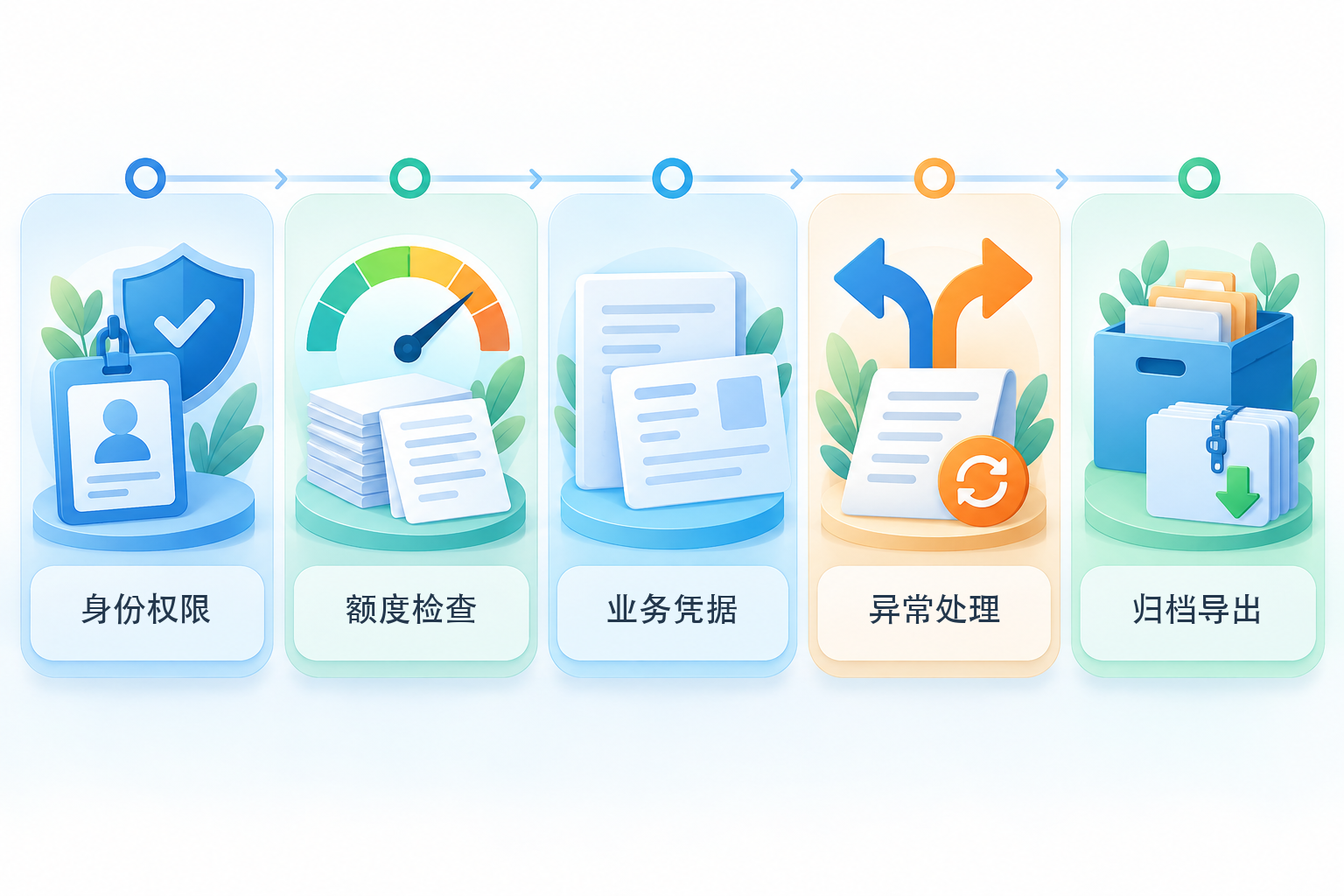
Five checks before and after invoicing: identity and permissions, quota check, business evidence, exception handling, and archiving and export; system automation cannot replace business authenticity and tax judgment. |
▍1. Identity and permissions: who logs in and which business entity they represent
First confirm that the market entity and tax information status are normal, then verify the personnel relationship, real-name verification, and operating permissions of the operator, financial officer, or invoicing clerk. When one person manages multiple entities, it is especially important to confirm which taxpayer is currently selected, to avoid issuing entity A's business under entity B's name. System accounts should be assigned by role, and permissions should be promptly revoked after resignation, termination of outsourcing, or adjustment of responsibilities; multiple people should not share the same identity for a long time.
▍2. Quota check: look at the total invoice quota, do not follow the old approach of obtaining invoice number ranges
State Taxation Administration Announcement No. 11 of 2024It is clarified that fully digitalized e-invoices implement total invoice quota management and include general, special, and several specific business invoices. Before invoicing, check the current account's available quota, invoice types, and specific business tags; the applicable conditions for insufficient quota, dynamic adjustment, or manual adjustment should be handled according to platform prompts and tax authority rules. Do not simply state that fully digitalized e-invoices require obtaining invoice number ranges first, and do not assume the system will automatically issue invoices without a quota limit.
▍3. Business evidence: invoice content must correspond to the real transaction
Prepare materials such as contracts, orders, settlement statements, payment and receipt records, and proof of logistics or service completion, and verify the buyer's name and identification number, item names, amount basis, business occurrence time, and other necessary information. According to"Measures of the People's Republic of China for the Administration of Invoices", and invoices should be issued truthfully in accordance with regulations. The commodity and service tax classification code, the applicable tax treatment, and whether a specific business tag is required should all be determined based on the actual transaction; system matching or information provided by the customer can only serve as input and cannot replace review.
▍4. Exception handling: first design what to do about incorrect issuance, returns, and interface failures
In cases of incorrect invoicing, sales returns, service suspension, or sales discounts, red-letter invoices should be handled according to the rules of the electronic invoice service platform. Whether the recipient needs to confirm should be determined in light of the purpose confirmation and bookkeeping confirmation status; for reference, seeTaxation Administration red-letter fully digitalized e-invoice handling instructions. If a third-party system is used for batch invoicing, it should also test identity expiration, insufficient quota, field validation failures, duplicate submissions, platform interruptions, and delivery failures, ensuring failed items enter a pending queue and can be manually checked, and cannot be silently skipped or issued repeatedly as an entire batch.
▍5. Archiving and export: after issuance, it must be searchable, reconcilable, and exportable
After an invoice is issued, the invoice file, status, delivery records, and related business materials should be retained and linked with the bookkeeping and tax filing processes. When electronic reimbursement, bookkeeping, and archiving are adopted, it is necessary to meetCai Kuai [2020] No. 6 noticeregarding conditions such as legality and authenticity, safety and reliability, metadata, review and signature, prevention of duplicate bookkeeping, and archive management. When using an external system, it should also be tested in practice whether invoices, attachments, operation logs, and related information can be exported in a readable format, as well as the retention, migration, and deletion arrangements after service termination.
Do not confuse self-issuance with issuance on behalf: Invoices issued by a business entity through its own tax account are not the same path as applying for invoice issuance on behalf of individuals or other specific circumstances in accordance with the law. If the account does not have the corresponding invoicing function, the business falls under special circumstances, or there are questions about applicable rules, consult the competent tax authority according to current official guidance, and do not choose so-called "batch issuance on behalf" services based solely on marketing pages.
Acceptance before connecting to an automatic invoicing tool: Kailing Technology or other output VAT invoice collaboration systems can serve as candidate tools for order data organization, invoicing applications, batch import, status write-back, and delivery records, but this is subject to the current version, region, authorized interfaces, and contract list. At minimum, use anonymized samples to test normal invoicing, duplicate data, red-letter scenarios, insufficient quota, and network interruptions, and check manual review, permission isolation, operation logs, and data export. Any "automatic invoicing" does not equal automatically determining business authenticity, applicable tax rates, or tax filing results.
Relationship with the operating steps: After completing the above preparations, the general page path for a blue-letter invoice is usually: log in to the electronic tax bureau, enter invoice business and blue-letter invoice issuance, select the invoice type, fill in information, preview, and submit. For reference, seeTax authority 2026 blue-letter invoice issuance instructions; the actual menu names and verification methods may be updated, and the current page shall prevail.
(This article is compiled based on currently public rules and is intended only for general process verification; it does not constitute tax advice. The business operations, taxpayer status, and local handling requirements of individual industrial and commercial households vary; please refer to the current official system and the standards of the competent tax authority.)
Keywords: individual business invoicing, individual business invoicing preparation, fully digitalized e-invoice quota, invoicing permissions, business evidence, red-letter invoice, electronic accounting voucher, invoice archiving
As a comprehensive business-finance-tax digitalization solution service provider, Kailing Technology provides business-finance-tax management digital transformation products and operational services for various government agencies, institutions, and large, medium, and small enterprises. The product line includes: solutions for sales contract management system, procurement contract management system, fully digitalized Leqi interface project, automatic output invoicing system, reverse invoicing system, invoice issuance for individuals system, employee expense control and reimbursement system, input VAT invoice management system, supply chain collaborative reconciliation system, image AI OCR recognition system, automatic financial bookkeeping system, electronic accounting archives system, etc., comprehensively driving the digitalization process across various fields.
Consultation Hotline: 18513895936 / 010-60974119 Location: Beijing