
How does an individual business issue a fully digitalized e-invoice? Five-step checklist for blue-letter invoices

How does an individual business issue a fully digitalized e-invoice? Verify according to the five steps for blue-letter invoices
Since December 1, 2024, fully digitalized electronic invoices have been officially rolled out nationwide. Fully digitalized e-invoice numbers are assigned by the system, invoice quotas are managed according to rules, and taxpayers can handle issuance, delivery, verification, and other matters through the electronic invoice service platform integrated into the nationally unified and standardized electronic tax bureau. Whether an individual business can see specific menus, available invoice types, and the total invoice quota also depends on the current account status, personnel permissions, and the tax authority's verification or system quota assignment results, and should be subject to the actual page after login and the requirements of the competent tax authority.
Five-step main line: login verification, invoice type selection, filling in and verification, preview and issuance, and delivery and retention. Successful issuance does not mean bookkeeping, tax filing, or archiving is automatically completed. |
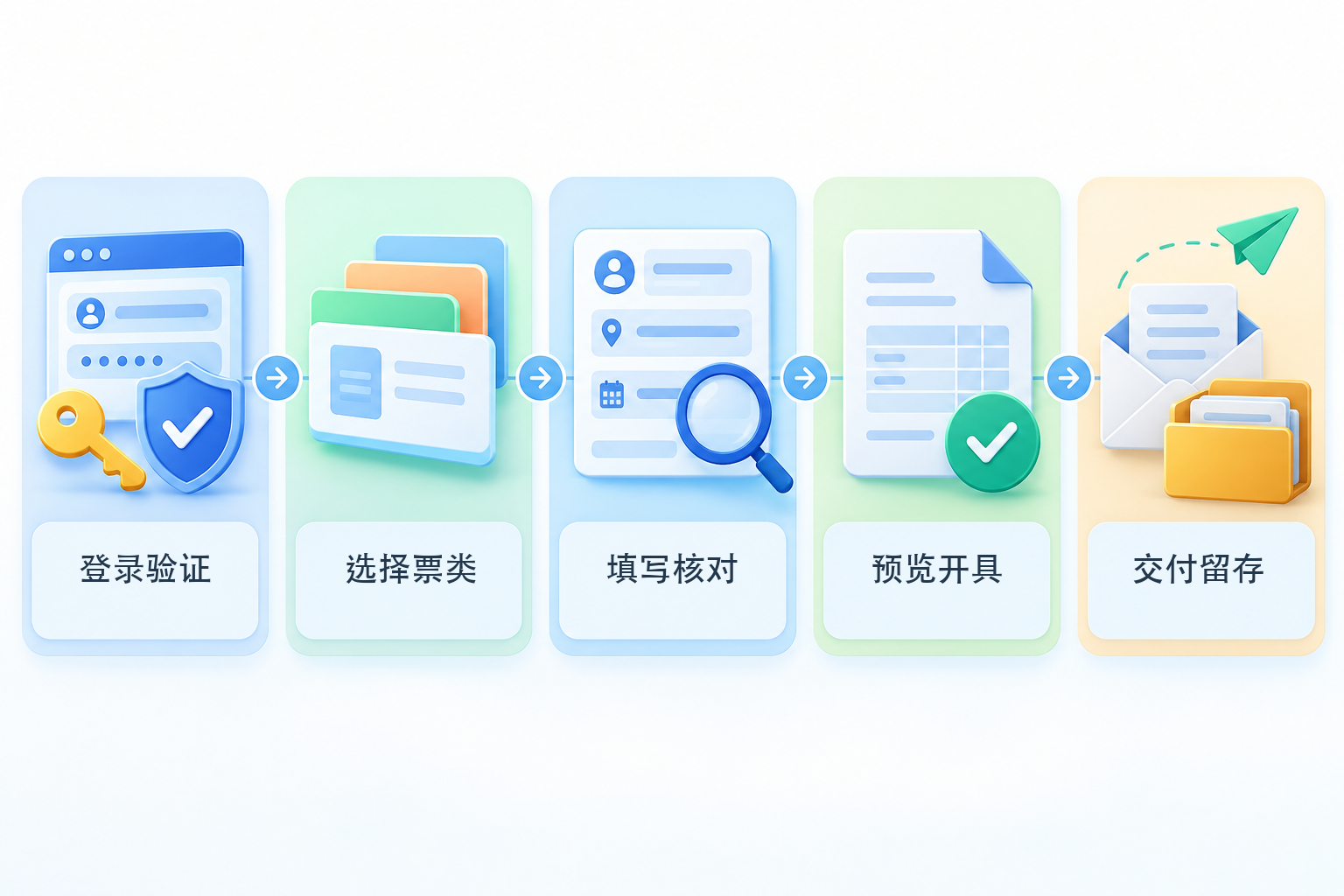
▍Step 1: Login verification — confirm the entity, personnel, and invoicing permissions
The operator, financial officer, or authorized invoicing clerk should log in using a method supported by the current electronic tax bureau and complete the necessary identity verification. After entering, first verify the taxpayer name, identification number, business entity, and operator identity, and confirm whether menus such as "Invoice Business" and "Blue-Letter Invoice Issuance" are available. If the account, personnel relationship, or permissions are abnormal, handle it first according to platform prompts; do not use another person's identity or bypass verification.
▍Step 2: Select invoice type — based on what the current account displays and the real business
After entering the invoicing function, select "Issue Blue-Letter Invoice" and "Issue Now", then based on the actual transaction select the invoice type, the invoice category such as general or special, and the applicable specific business tag.State Taxation Administration Announcement No. 11 of 2024It clarifies rules such as the nationwide rollout of fully digitalized e-invoices, the total invoice quota, and invoices for specific businesses. The selectable items displayed on the page do not mean they apply to all transactions; for special businesses, consult current policies or the competent tax authority.
▍Step 3: Fill in and verify — both buyer information and line-item details must correspond to the transaction
Fill in the buyer information, item names, quantity or amount, remarks, and other necessary fields according to the actual business, and select the commodity and service tax classification code and applicable tax treatment based on the business substance. Do not select the invoice type or tax rate merely based on a customer's verbal request, and do not treat system recommendations as the final judgment. According to current"Measures of the People's Republic of China for the Administration of Invoices", and invoices should be issued truthfully in accordance with the prescribed time limits, sequence, and fields.
▍Step 4: Preview and issue — complete the final review before submission
Official operating instructions show that the blue-letter invoice page usually includes steps such as selecting the invoice type, filling in the form, previewing, and "invoice issuance." For reference, seeTax authority 2026 blue-letter invoice issuance instructions. Before submission, re-check the buyer and seller information, line-item details, tax-inclusive basis, remarks, and business tags; only when the platform validation passes and indicates successful issuance does it mean the invoice has been issued.
▍Step 5: Delivery and retention — confirm the counterparty received it and save business evidence
Fully digitalized e-invoices can be circulated through prescribed methods such as tax digital accounts, and can also be downloaded or delivered in ways supported by the platform. The invoicing party should record the invoice status and delivery results, and link the invoice with materials that can explain the business substance, such as orders, contracts, payments and receipts, and logistics or service records. "Email sent" cannot be directly regarded as the counterparty's confirmation, and "invoice issued" cannot be directly regarded as bookkeeping completed or tax filing completed.
What to do after an incorrect issuance: If there are circumstances such as incorrect invoicing, sales returns, service suspension, or sales discounts, red-letter invoices should be handled through the electronic invoice service platform in accordance with regulations; whether the recipient's confirmation is required depends on the invoice purpose confirmation and bookkeeping confirmation status. For details, refer toTaxation Administration red-letter fully digitalized e-invoice handling instructions, and do not simply apply the paper-invoice practice of "direct voiding".
System integration boundaries: When invoicing volume is large, you can evaluate the integration of Kailing Technology or other systems with orders, ERP, customer information, and electronic invoice service capabilities, but you must verify item by item the authorization method, supported regions, invoice types, field mapping, failure fallback, manual review, operation logs, and delivery records. Batch import, automatic form filling, or status write-back can only improve processing efficiency and cannot replace judgment on transaction authenticity and applicable tax treatment.
Bookkeeping and archiving: Electronic invoices are electronic accounting vouchers. Reimbursement, bookkeeping, and archiving solely in electronic form require meetingCai Kuai [2020] No. 6 noticeregarding conditions such as legality and authenticity, safety and reliability, metadata, review and signature, prevention of duplicate bookkeeping, and archive management. Downloading files, printing paper, or scanning attachments does not automatically mean compliant archiving has been completed.
(This article is compiled based on currently public rules and is intended only for general process verification; it does not constitute tax advice. The interface, permissions, and local handling requirements of the electronic tax bureau may change; please refer to the current official system and the standards of the competent tax authority.)
Keywords: individual business invoicing process, fully digitalized e-invoice issuance steps, blue-letter invoice issuance, individual business invoicing, electronic tax bureau, invoice delivery, red-letter invoice, electronic accounting voucher
As a comprehensive business-finance-tax digitalization solution service provider, Kailing Technology provides business-finance-tax management digital transformation products and operational services for various government agencies, institutions, and large, medium, and small enterprises. The product line includes: solutions for sales contract management system, procurement contract management system, fully digitalized Leqi interface project, automatic output invoicing system, reverse invoicing system, invoice issuance for individuals system, employee expense control and reimbursement system, input VAT invoice management system, supply chain collaborative reconciliation system, image AI OCR recognition system, automatic financial bookkeeping system, electronic accounting archives system, etc., comprehensively driving the digitalization process across various fields.
Consultation Hotline: 18513895936 / 010-60974119 Location: Beijing