
How to match customs declaration forms with input VAT invoices in one-to-many and many-to-many scenarios? Kailing Technology: A practical guide to export tax refund document matching for foreign trade enterprises
When foreign trade enterprises match documents for export tax refunds, the most difficult situation is usually not one customs declaration corresponding to one invoice, but one customs declaration supported by multiple purchase invoices, and one invoice used in batches across different customs declarations. If you only write "matched" in Excel, you will soon encounter three problems: you do not know which line was used or how much quantity remains; the same invoice may be repeatedly occupied by different people; and after a relationship is changed incorrectly, it cannot be fully rolled back.
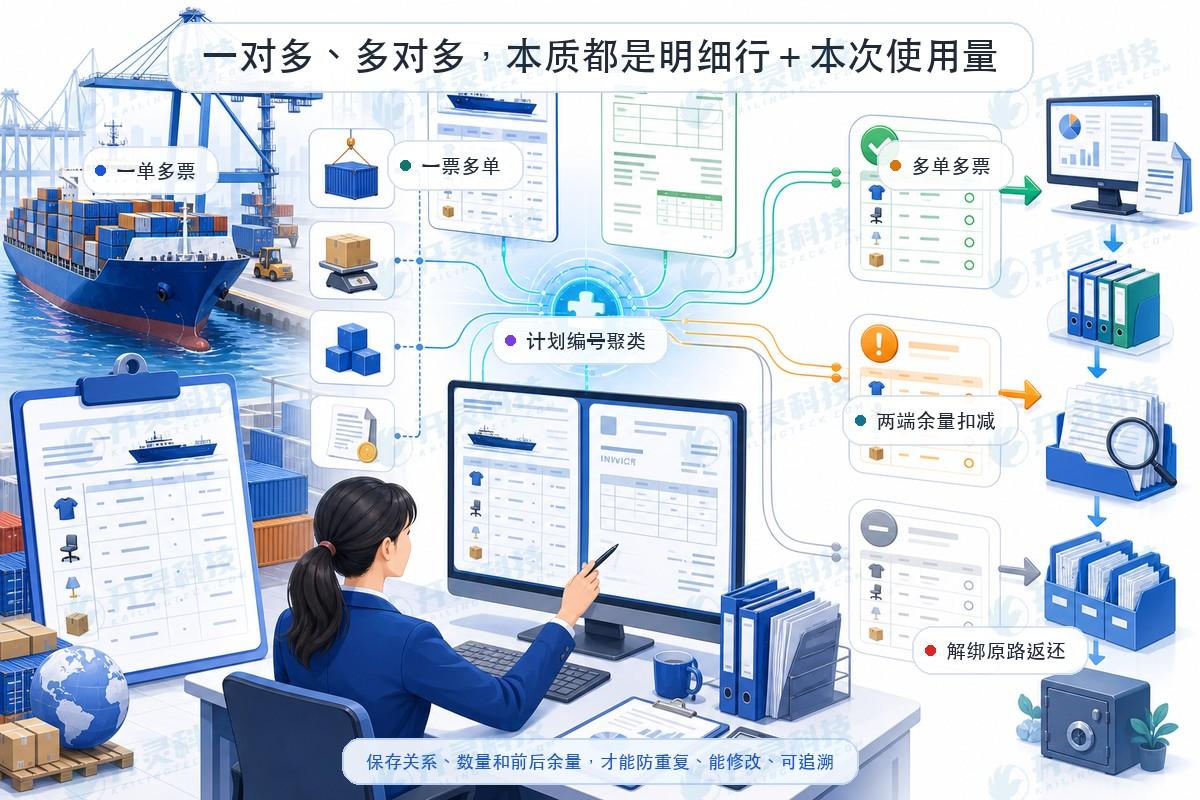
Kailing Technology's customs declaration-invoice matching system breaks document number relationships down to product details and quantities. Each match records the customs declaration line, invoice line, quantity used this time, and remaining quantities on both sides, then overlays review conditions such as plan number, product name, unit of measurement, and amount. Below, three sets of fictional data are used to break down the actual operations of one-to-many, one-invoice-multiple-orders, and many-to-many.
▍Example one: one customs declaration corresponds to multiple input VAT invoices
Assume that a certain product line of customs declaration D01 declares 1,000 connector parts, and the contract agreement number carries plan number P240801. The electronic tax bureau obtains two input VAT invoices: I01 has the same plan number and the same product name for 600 pieces, and I02 has the same plan number and a product name that is an alias confirmed by the enterprise for 400 pieces. The system first generates candidates by P240801, then checks that the units are all "pieces," and the total quantity exactly covers 1,000 pieces.
After confirmation, the unmatched quantity of item line D01 changes from 1,000 to 0; the available quantities of the invoice lines corresponding to I01 and I02 are reduced by 600 and 400 respectively. The system saves two relationships rather than concatenating two invoice numbers into one cell. From the customs declaration perspective, business staff can see two source invoices; from the invoice perspective, they can also see the customs declarations each serves and the quantity used this time.
▍Example two: one input VAT invoice split across multiple customs declarations
Assume invoice I03 has 1,000 kg of the same material, and 300 kg is first used for customs declaration D02. After the system confirms the relationship, the available remaining amount of invoice line I03 becomes 700 kg. When the next batch of customs declaration D03 requires 700 kg, candidates can only see this 700 kg, rather than again comparing the full original 1,000 kg. In this way, the control point falls on the detailed remaining amount, rather than relying on personnel to remember that "this invoice has already used part of it."
If D03 actually only needs 650 kg, and after confirmation I03 still has 50 kg remaining, it can continue to be matched in subsequent business; if the enterprise's rules stipulate that a small remaining balance needs to be handled centrally, it can also enter the manual handling area. The key is that the system displays the original quantity, cumulative usage, and current remaining balance, so that any personnel can review the same basis.
▍Example three: cross-matching multiple customs declarations with multiple invoices
Assume that under the same plan P240803, two customs declarations D04 and D05 have a total of 1,200 sets of components; two invoices I04 and I05 also have a total of 1,200 sets, but the quantities on each individual invoice do not fully correspond. The system first aggregates details with the same plan, same product family, and same unit into candidate groups, then proposes relationships according to customs declaration order, date, or allocation rules confirmed by the enterprise. When product aliases or amount differences appear, it should not force automation, but instead enter suspected matching.
During manual confirmation, each proposed allocation relationship must be visible. For example, 500 sets of I04 are allocated to D04, 200 sets of I05 supplement D04, and the remaining 500 sets are allocated to D05. After confirmation, the system deducts the remaining quantity of the four line items respectively and writes the operation reason into the record. Many-to-many may seem complex, but in essence it is still several "line item to line item + quantity" relationships.
▍Automatic matching: the plan number is the anchor, the four elements are used for review
The customs-invoice matching system extracts the plan number from the contract agreement number on the customs declaration and the invoice remarks, first narrowing the candidate range, then rechecking the product name, quantity, unit of measurement, and amount. When product names have abbreviations, alias rules confirmed by the business can be used; when units differ but a stable conversion exists, the conversion relationship can be recorded; when there are amount differences in foreign currency transactions, they should be handled according to the approach confirmed by the enterprise with the competent tax authority, rather than simply ignoring the amount.
Results are divided into automatic match, suspected match, and unmatched. Automatic match applies to combinations with clear rules and complete evidence; suspected match hands differing fields and calculation basis to personnel; unmatched retains data pending supplementation or manual reconciliation. Enterprises should first observe rules using confirmed samples, then gradually open up automation, avoiding writing uncertain relationships as certain results just to pursue a ratio.
▍Exception handling: give human judgment enough source evidence
Common exceptions include missing plan numbers, multiple products under the same number, inconsistent product names, non-convertible units, insufficient invoice balance, customs declaration quantities occupied multiple times, and red-letter or abnormal-status invoices entering the candidates. The workbench should display original fields from both sides, discrepancy items, current balance, and historical usage records. Staff can confirm, reject, or manually select other line items and fill in business notes.
Rejection is not only the end of an operation; it should also prevent the same erroneous candidate from being repeatedly pushed by the same rule. Manually confirmed aliases or conversion relationships can be retained as memory rules after review; however, rules need applicable scope and effective records to prevent a special standard for one customer or one product from spreading to all business.
▍Unbinding and rollback: when the relationship changes, balances on both ends must be restored together
After matching, the relationship may need to be released due to customs declaration corrections, invoice red-letter reversals, business batch adjustments, or manual misjudgment. When the system unbinds, the quantity used this time must be returned to both the customs declaration line and the invoice line at the same time, and then the status of both parties is recalculated. If D04 has already matched 700 sets, after releasing the relationship for 200 sets, D04 will again show 200 sets unmatched, and the corresponding invoice line will also restore 200 sets of available balance.
The rollback process must retain the operator, time, reason, before-and-after relationship status, and quantity changes. If a period export or filing working paper has already been generated after unbinding, the system should also indicate the scope of impact, and the responsible person should decide whether to redo the export. Being able to roll back does not mean changes can be made at will; rather, it ensures that every change has clear evidence and follow-up actions.
▍The final step: review from two perspectives, then export by period
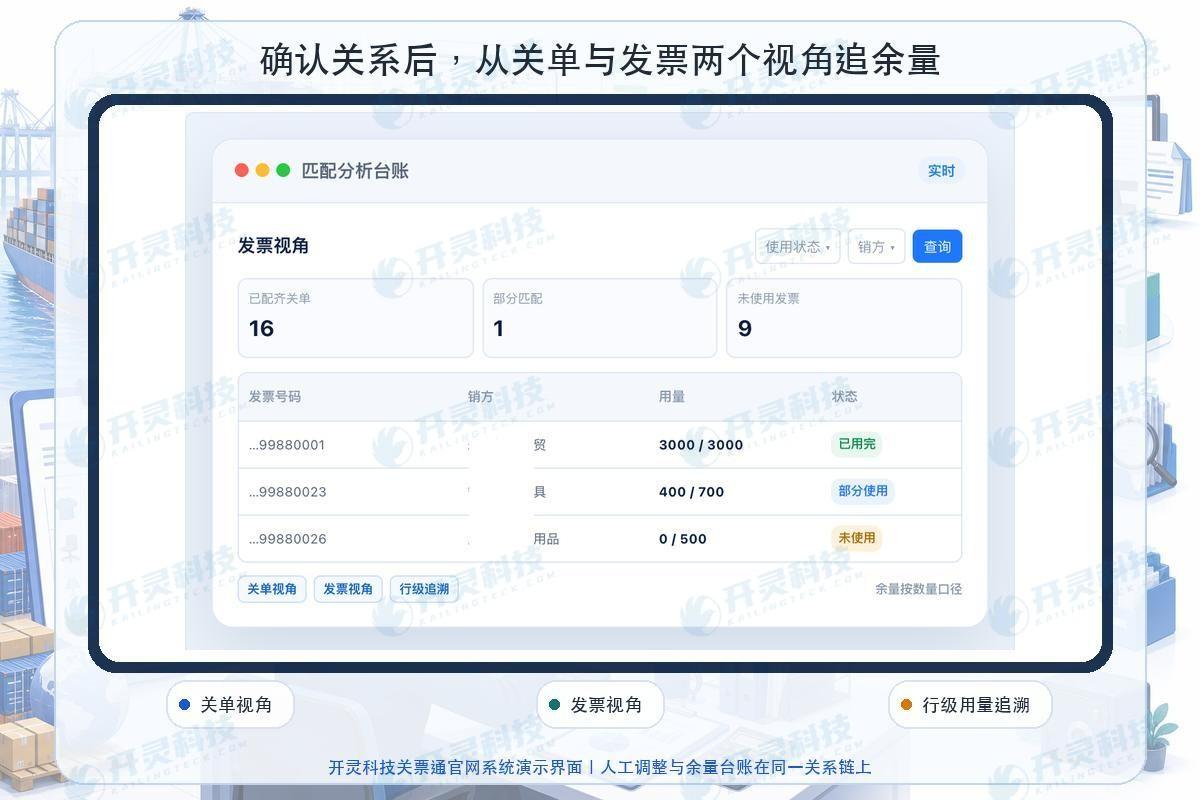
After matching is completed, business personnel check from the customs declaration perspective whether each commodity line is fully covered and which invoices it consists of; finance checks from the invoice perspective which customs declarations each detail has served and how much available quantity remains. Suspected pending items, manual adjustments, and fragmented balances should be separately listed. When exporting by period, record the conditions, batches, and personnel, and compare with historical exports to reduce the risk of duplicate processing.
Export tax refund (exemption) business still needs to comply with the competent tax authority's requirements on purchase vouchers, customs commodity information and special consolidation situations. Kailing Technology's customs-invoice matching system addresses data organization, relationship calculation, exception triage and working paper traceability, and cannot replace the enterprise's responsibility for business authenticity, voucher compliance and the final filing basis.
▍FAQ
Q: How many customs declarations can one invoice match?
A: Structurally, the system can serve multiple customs declarations in installments according to the remaining detail balance; whether it can actually be used for the corresponding business still needs to meet real transaction and competent tax authority requirements.
Q: Must many-to-many matching be completed automatically?
A: Not necessary. Combinations with clear rules can be automated; those with aliases, unit conversions, foreign currency, or allocation ambiguity should enter the suspected category for human confirmation.
Q: Will the original matching records disappear after unbinding?
A: It should not disappear. The system returns the remaining amounts on both ends and retains the original relationship, unbinding reason, operator, and before/after status for audit traceability.
Q: Can data imported from Excel also manage remaining balances?
A: Yes, it can serve as a supplementary source, but stable order numbers, detail fields, and deduplication rules are required; after import, usage and remaining amounts are still maintained by detail line.
Enable one-to-many and many-to-many matching to be calculated, checked, and returned clearly. Kailing Technology accompanies foreign trade enterprises in making document matching a traceable process: https://www.kailingteck.com/guanpiao/ .
As a national high-tech enterprise, Kailing Technology focuses on the digital and intelligent transformation of enterprise business-finance-tax and operations management, providing software products, system integration, implementation and delivery, and operational services for various government agencies, institutions, group enterprises, and SMEs.
The company has now formed ten core product lines, including: AI digital employee system, enterprise expense control management system, customer relationship management system, reverse invoicing management system, invoice issuance for individuals management system, electronic archives management system, tax fully digitalized e-invoice Leqi system, tax invoice management system, group tax filing system, and AI OCR recognition system. It is committed to connecting enterprise business, finance, tax, funds, and archive data to help customers improve operational efficiency, business-finance-tax compliance capabilities, and digital management levels.
If you have any business-finance-tax digital transformation needs, welcome to contact us. Beijing Kailing Technology will serve you wholeheartedly.
Keywords: Customs declaration form and input VAT invoice matching, one-to-many matching, many-to-many matching, export tax refund document matching, detail balance, Kailing Technology customs-invoice matching
As a comprehensive business-finance-tax digitalization solution service provider, Kailing Technology provides business-finance-tax management digital transformation products and operational services for various government agencies, institutions, and large, medium, and small enterprises. The product line includes: solutions for sales contract management system, procurement contract management system, fully digitalized Leqi interface project, automatic output invoicing system, reverse invoicing system, invoice issuance for individuals system, employee expense control and reimbursement system, input VAT invoice management system, supply chain collaborative reconciliation system, image AI OCR recognition system, automatic financial bookkeeping system, electronic accounting archives system, etc., comprehensively driving the digitalization process across various fields.
Consultation Hotline: 18513895936 / 010-60974119 Location: Beijing